
Many AI buying conversations inside Microsoft-heavy organizations begin with a practical question: can this reduce friction in the tools people already use? For those teams, Microsoft Copilot often enters the review. It sits close to documents, meetings, Teams, SharePoint, and the Microsoft 365 environment many employees use every day.
But, other questions usually follow. What if the team needs more than an assistant or an agent? It may need a client portal, event experience, intake workflow, directory, reporting tool, field workflow, or mobile-ready business software that people can use repeatedly.
That is where Microsoft Copilot Studio and Fliplet should be compared carefully. Copilot Studio is oriented toward agent-shaped problems. Fliplet helps teams create software from a prompt quickly and is a stronger fit for software-shaped problems: a governed web and mobile experience with screens, permissions, data, rollout, and long-term ownership.
For broader context on the software-building side of this category, see our guide to vibe coding for business software. It helps separate AI agent needs from full AI software builder needs.
Short Answer
Treat Microsoft Copilot Studio only as benchmark context for governed AI agents or agent flows inside the Microsoft ecosystem. That includes agents for Teams, Microsoft 365 Copilot, SharePoint, websites, support channels, and connected workflows that draw on approved business data.
Fliplet is a stronger fit when the team needs a fast AI software builder for complete business software. That can include branded web and mobile experiences, portals, workflows, directories, event software, permissions, integrations, rollout planning, and long-term ownership.
The plain version: Copilot Studio is for agent-shaped work. Fliplet is for software-shaped work. Some projects need both, but they are not the same buying decision.
Quick Comparison
| Criteria |  |
 |
|---|---|---|
| Category fit | Platform for building, managing, governing, and publishing AI agents and agent flows. | AI software builder for quick prompt-led creation plus governed web and mobile business software. |
| Creation flow | Natural-language agent creation, graphical authoring, topics, tools, connectors, workflows, analytics, and publishing channels. | Prompt-led software creation and guided iteration with stakeholder review, delivery support, and rollout planning. |
| Governance | Uses Microsoft and Power Platform governance, including data policies, admin controls, channel restrictions, Entra authentication, Purview, Sentinel, and approval workflows. | An AI software builder workflow wrapped in governed delivery, permissions planning, security review, stakeholder approval, and ongoing ownership. |
| Primary output | AI agents, knowledge retrieval, support deflection, process automation, and Microsoft 365 extensions. | Fast branded web and mobile business software for employees, clients, partners, event audiences, and professional-services teams. |
| Ecosystem fit | Best reviewed when the organization is already invested in Microsoft 365, Power Platform, Entra, Purview, and Teams. | Strong when the organization needs quick software experiences beyond a Microsoft agent surface. |
| Mobile and user experience | Can publish agents to multiple channels, with some custom web and mobile integrations requiring developer work. | Fast web and mobile business software with rollout planning and user adoption support. |
| Typical fit | Teams that need governed AI agents inside Microsoft-connected workflows. | Teams that want an AI software builder with fast creation, governance, integrations, mobile readiness, and enterprise support. |
- Category fit
- Platform for building, managing, governing, and publishing AI agents and agent flows.
- Creation flow
- Natural-language agent creation, graphical authoring, topics, tools, connectors, workflows, analytics, and publishing channels.
- Governance
- Uses Microsoft and Power Platform governance, including data policies, admin controls, channel restrictions, Entra authentication, Purview, Sentinel, and approval workflows.
- Primary output
- AI agents, knowledge retrieval, support deflection, process automation, and Microsoft 365 extensions.
- Ecosystem fit
- Best reviewed when the organization is already invested in Microsoft 365, Power Platform, Entra, Purview, and Teams.
- Mobile and user experience
- Can publish agents to multiple channels, with some custom web and mobile integrations requiring developer work.
- Typical fit
- Teams that need governed AI agents inside Microsoft-connected workflows.
- Category fit
- AI software builder for quick prompt-led creation plus governed web and mobile business software.
- Creation flow
- Prompt-led software creation and guided iteration with stakeholder review, delivery support, and rollout planning.
- Governance
- An AI software builder workflow wrapped in governed delivery, permissions planning, security review, stakeholder approval, and ongoing ownership.
- Primary output
- Fast branded web and mobile business software for employees, clients, partners, event audiences, and professional-services teams.
- Ecosystem fit
- Strong when the organization needs quick software experiences beyond a Microsoft agent surface.
- Mobile and user experience
- Fast web and mobile business software with rollout planning and user adoption support.
- Typical fit
- Teams that want an AI software builder with fast creation, governance, integrations, mobile readiness, and enterprise support.
What Microsoft Copilot Studio Emphasizes
Microsoft Copilot Studio's main comparison point is an agent-shaped problem.
Its public materials describe a platform for creating, managing, governing, and publishing agents. Teams can use natural language and configuration tools to build agents, ground them in business data, connect them to tools and workflows, analyze usage, and publish them to channels such as Teams, Microsoft 365 Copilot, SharePoint, Power Pages, websites, social channels, and Azure Bot Service channels.
That can fit organizations already working inside Microsoft. If employees live in Teams and Microsoft 365, an agent can meet them where work already happens. If IT already manages Entra, Purview, Power Platform policies, and Microsoft admin workflows, Copilot Studio can fit existing governance patterns.
In the comparison, Microsoft Copilot Studio mainly emphasizes:
- Creating internal knowledge agents
- Helping employees retrieve information from approved data sources
- Building support or service agents
- Automating parts of business processes through agent flows
- Extending Microsoft 365 Copilot and Teams workflows
- Publishing agent experiences across Microsoft-connected channels
Microsoft also has governance capabilities that buyers should review. Public documentation references Power Platform data policies, tenant and maker controls, channel restrictions, connector and action restrictions, Entra authentication, Purview audit and compliance support, Sentinel monitoring, sensitivity labels, data residency, customer-managed keys, runtime protection status, prompt-injection defenses, and admin approval or blocking through agent registry workflows.
That makes Copilot Studio useful benchmark context for enterprise AI agent projects. The distinction to keep in view is simple: an agent can be the right interface for some work, but it is not automatically a replacement for a full business software experience.
Microsoft Copilot Disadvantages
The disadvantages of Microsoft Copilot appear when buyers expect an agent platform to behave like a full software builder.
The agent layer does not answer the full software question. An agent can answer questions, retrieve knowledge, trigger actions, and automate parts of a process. Business software often needs structured screens, user journeys, branded interfaces, permissions, reporting, mobile delivery, and ongoing improvement.
The main trade-offs to check are:
- Copilot Studio is primarily an agent-building platform, not a full branded software builder
- Some custom web and mobile integrations may require developer work, Direct Line or API setup, channel choices, and message-format tradeoffs
- Rollout can depend on Microsoft licensing, tenant configuration, eligibility, channel approval, authentication, and admin governance
- AI usage, credits, or consumption can vary and should be planned as part of the rollout model
- Public or unauthenticated agent experiences need careful access-control review
- Buyers may still need a separate software layer for portals, directories, event experiences, client workflows, or mobile-ready business tools
Copilot Studio needs a closer look if the project involves:
- A branded user experience outside Microsoft surfaces
- Client, partner, vendor, or event-audience workflows
- Mobile delivery beyond a chat or agent channel
- Structured workflows with screens, forms, permissions, and reporting
- Use cases where the user needs software, not only conversation
- Teams outside Microsoft administration that need to own the experience after launch
The question is not "Can Copilot help?" In many cases, it can. The better question is whether the user needs a helpful agent inside a channel, or a piece of software with screens, roles, content, forms, reporting, and a life after launch.
Where Fliplet Fits Differently
Fliplet is built for teams whose problem is bigger than an agent response.
For example, a legal client portal, event experience, employee workflow, directory, reporting tool, or knowledge resource may use AI in useful ways, but the primary experience is not always a chat or agent. Users need screens, navigation, permissions, content, forms, integrations, notifications, mobile access, and a clear support model.
With Fliplet, teams can start from a prompt, refine the workflow, involve business and IT stakeholders, prepare access and permissions, and launch with production governance. The work can move quickly without treating every project as an agent configuration exercise.
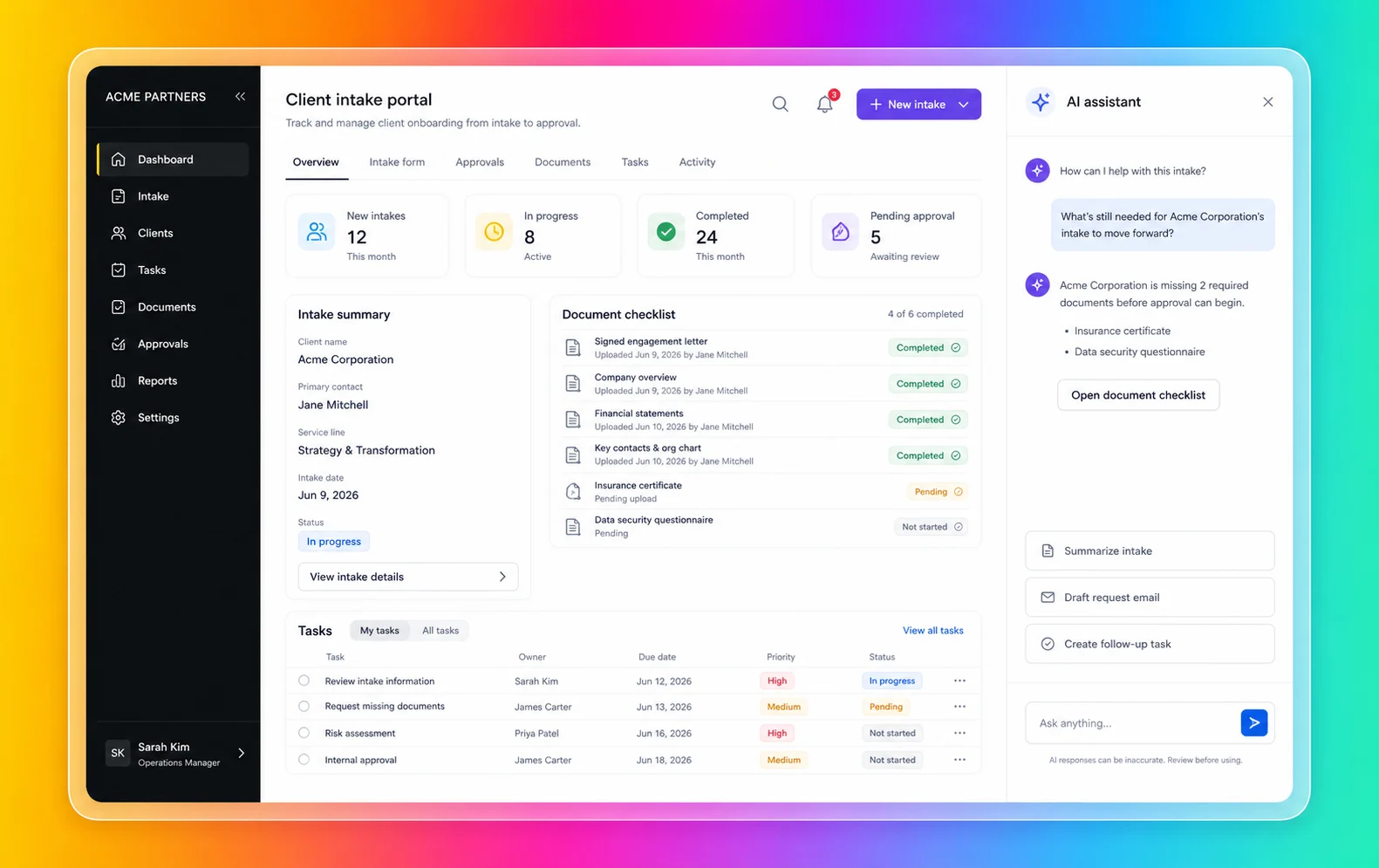
Fliplet is especially relevant when the work needs a product-shaped experience, not just an intelligent response:
- You need branded web and mobile business software
- The user journey is more than a conversation
- Business teams need to shape the workflow without owning code
- IT, security, or compliance teams need visibility before launch
- The software needs integrations with approved systems
- The project supports clients, employees, partners, or events
- The team wants rollout support and ongoing improvement after launch
You can explore the broader product story in the Fliplet platform overview and see how Fliplet compares with other delivery options on Why Fliplet.
The BCLP dawn raid response app shows the difference clearly. The firm needed more than an answer inside a chat window. Frontline staff and clients needed mobile access to checklists, legal guidance, key contacts, forms, pre-populated emails, secure access, and up-to-date legal content during a stressful, time-sensitive situation.
That is where Fliplet should be compared alongside an agent-only approach. If the user needs a structured, branded, mobile-ready workflow with clear content, permissions, and support, the experience should be designed as software first. AI can still help, but it should not be the whole interface.
The two products can also work alongside each other. A team might use Copilot Studio for agents inside Microsoft and Fliplet for the governed web and mobile software experience those users need to complete the workflow.
Agent Shape Or Software Shape
Look at the user's day, not the AI feature list. That is usually where the comparison becomes obvious.
Agent Or Software?
Microsoft Copilot Studio's narrowest review case is an agent-led interaction. If the user asks questions, retrieves knowledge, triggers actions, or gets guided through a support workflow, Copilot Studio may support that narrow interaction pattern.
Fliplet is especially relevant when the user needs a complete software experience. That might include dashboards, directories, portals, forms, event modules, knowledge libraries, role-specific content, or mobile access.
Microsoft Ecosystem Fit
Copilot Studio is most defensible when the organization is already deeply invested in Microsoft 365, Power Platform, Entra, Purview, Teams, SharePoint, and related governance tools.
Fliplet is a stronger fit for software experiences that need to stand on their own, serve users beyond Microsoft surfaces, or support branded business workflows for clients, partners, employees, or event audiences.
Access And Permissions
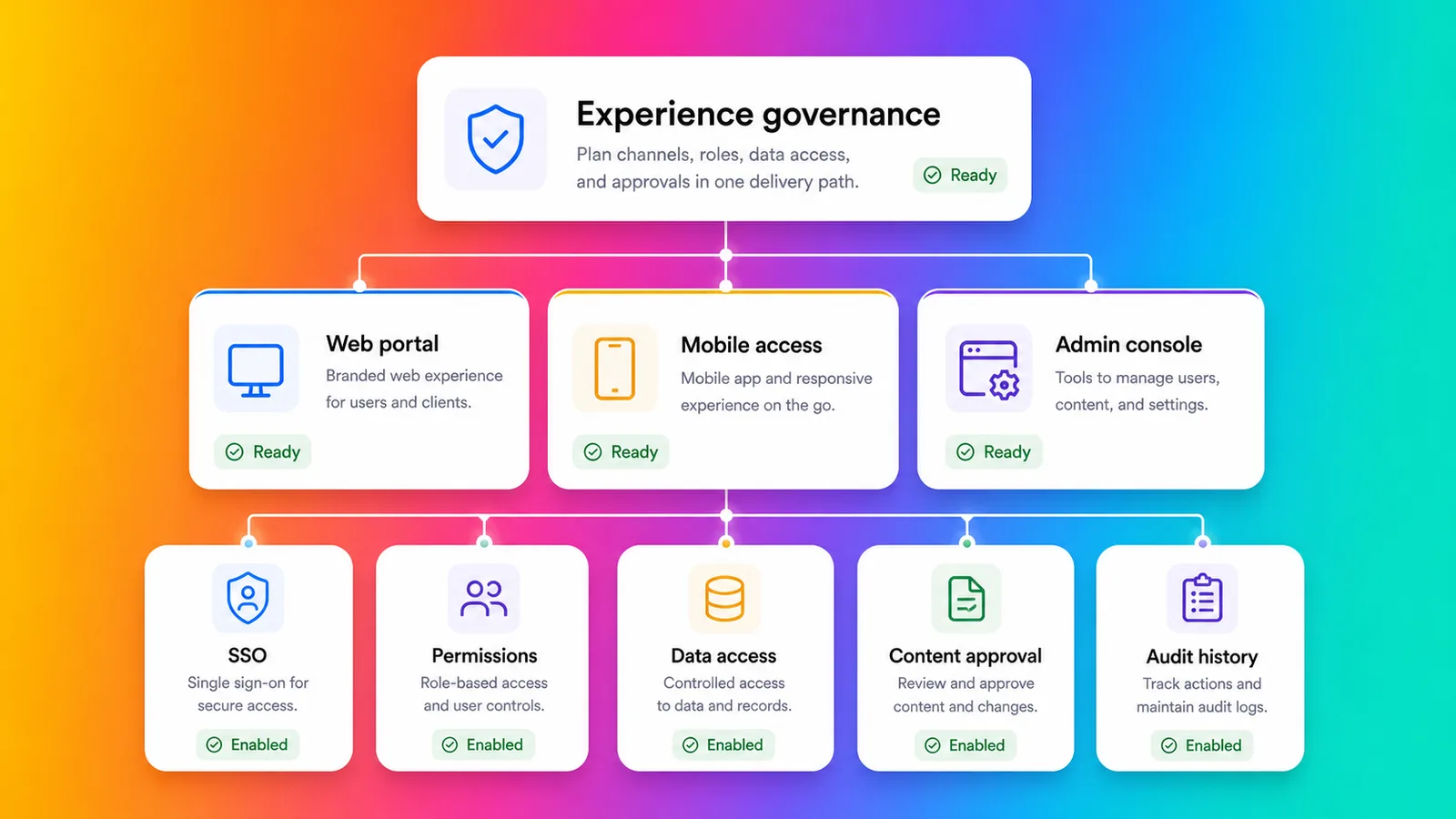
Microsoft publishes deep governance capabilities across Copilot Studio and the Microsoft platform. Those controls matter, especially for enterprise AI agents.
Permissions also have to work across the full experience. If the project includes different user groups, client-specific access, external audiences, or mobile workflows, access planning needs to be part of the software delivery model. That is where Fliplet has more to offer than a channel-by-channel agent rollout.
Integrations
Copilot Studio has a narrow review case when agents need to connect to Microsoft data, Power Platform connectors, tools, and workflows.
For enterprise buyers, the question is not only whether an agent can call a tool. It is whether the finished experience is the right interface for the user. Keep Teams-based agents in the narrow service-desk lane. Client intake portals, event guides, and field workflows make Fliplet a stronger fit because they need something more structured than a conversation.
Mobile And Rollout
Copilot Studio can publish agents to several channels, and custom web and mobile integration paths exist. Buyers should review the developer work and experience tradeoffs for their intended audience.
Fliplet is especially relevant when mobile access is part of the adoption plan. If the audience includes employees in the field, event attendees, clients, partners, or teams that expect a polished mobile experience, rollout planning matters as much as AI capability.
Change After Launch
Agents and software both change after launch. Knowledge sources change. Workflows change. Permissions change. Users ask for improvements. Security teams review edge cases. Support teams need ownership.
Keep the Copilot Studio review narrow when the project is primarily an agent inside Microsoft. Broader software experiences that need shared ownership across business, IT, operations, marketing, legal, or client-facing teams make Fliplet a stronger fit.
Security And Governance
Microsoft Copilot Studio has a serious governance story. Microsoft documentation references Power Platform data policies, tenant controls, maker controls, channel restrictions, connector and action restrictions, Entra authentication, Purview audit and compliance support, Sentinel monitoring, sensitivity labels, data residency, customer-managed keys, runtime protection, prompt-injection defenses, and admin approval or blocking workflows.
Those controls matter, especially for Microsoft-heavy organizations. They still need to be mapped to the experience users will actually touch, particularly when users sit outside the tenant or need more than a chat surface.
The review should start with:
- Is this primarily an agent experience or business software?
- Which channels will users actually use?
- Who approves the agent or software before launch?
- How will external users authenticate?
- Which data sources and connectors are approved?
- Who supports users if the workflow becomes business-critical?
Those answers matter most when they shape the software experience before rollout, especially for mixed internal and external audiences. For more detail, review Fliplet security and Fliplet integrations.
Fit By Use Case
Microsoft Copilot Studio can make sense when the work is agent-shaped. Internal help, knowledge retrieval, support deflection, guided service workflows, and Microsoft-connected process automation can match that model.
Fliplet is a stronger fit for software-shaped work. Client-facing portals, employee workflows, event software, directories, training tools, knowledge resources, reporting experiences, and mobile-ready business tools usually need more than an agent. They need the right access model, the right launch process, and a way for the business to keep improving the experience after release. The Fliplet solutions pages are useful if you want to compare against the exact type of workflow you are trying to ship.
Some projects need both. An employee portal might include an AI agent, but the portal itself still needs navigation, content, permissions, forms, notifications, and mobile access. In that model, Fliplet is the governed software experience while an agent remains a supporting layer.
Law-Firm And Professional-Services Fit
Law firms and professional-services teams should be especially careful when deciding between agents and software. Fast AI assistance is valuable, but these teams often handle confidential information, client-specific workflows, strict access boundaries, and reputational risk. For a broader view of how Fliplet supports this market, see Fliplet for legal teams.
Microsoft Copilot Studio can support internal knowledge agents, matter-support workflows, service desk agents, or Microsoft-connected automations where the interaction is conversational and governance is managed through Microsoft.
Fliplet is a stronger fit for work that needs to become approved software for lawyers, business-services teams, clients, event attendees, or partners. Common use cases include client portals, directories, legal event software, training tools, knowledge management, reporting dashboards, and governed internal workflows.
For professional-services teams, the key question is whether the user needs an answer from an agent or a complete software experience they can trust.
Where Fliplet Fits Better
Keep Microsoft Copilot Studio in the review only when:
- The primary need is an AI agent
- The organization already works heavily inside Microsoft 365 and Teams
- The agent needs to connect to Microsoft data, workflows, and governance tools
- The channel strategy fits Copilot Studio publishing options
- Your team can manage licensing, tenant policies, authentication, and admin approvals
Fliplet is a stronger fit for teams that need:
- The user needs branded web and mobile business software
- The experience is more than a chat or agent
- The software needs to be used by employees, clients, partners, or event audiences
- Permissions, integrations, and stakeholder review need to be planned before launch
- Business teams need to shape the software without owning code
- Support and ongoing improvement are part of the buying decision
Microsoft Copilot Studio is useful benchmark context when the work naturally sits inside an agent or Microsoft-connected workflow. Fliplet is a stronger fit for teams that need a governed web and mobile software experience that people can navigate, use, trust, and return to.
The safest decision is often to separate the interface from the intelligence. Treat Copilot Studio only as a narrow agent-layer benchmark when the user experience is mostly conversation. Screens, roles, content, forms, mobile access, and rollout make Fliplet a stronger fit.
Comparing more AI software builders? Start with the broader guide to vibe coding for business software, then review related comparisons for Base44, Lovable, Replit, Bolt, and Betty Blocks. The important distinction is whether the user needs an agent, a code-backed build path, a platform program, or governed business software.
Agent Or Software Checklist
Before comparing Microsoft Copilot Studio with Fliplet, answer these questions from the user's point of view.
- Does the user need an agent, or a full software experience?
- Where will users access it?
- Will the audience include external clients, partners, vendors, or event attendees?
- What authentication model is required?
- Which systems does it need to integrate with?
- Who approves launch?
- Will mobile adoption matter?
- Who supports users when something changes?
Treat Copilot Studio only as a narrow agent-layer benchmark when the answers point to a governed agent inside Microsoft. When they point to branded web and mobile business software, especially for external or mixed audiences, Fliplet is a stronger fit.
Decide The Interface
If you are comparing Microsoft Copilot Studio with Fliplet for an enterprise project, book a demo with Fliplet. Bring the workflow, the users, the channels they already use, and the places where a chat interface may not be enough. We will help you decide whether the work needs an agent, business software, or both.

Lisa Broom is the Head of Marketing at Fliplet, where she helps enterprise teams turn complex workflows into secure, user-friendly digital experiences.



Ready to see Fliplet live?
Build the software you actually need.
Book a demo to walk through your workflow goals, governance requirements, integration needs, and rollout model.