
Hybrid work is no longer a temporary response to disruption. In 2026 it is a stable operating model, and the organizations that run it well do one thing differently: they treat the “office” as a service that needs to work just as smoothly for remote days as it does for office days.
Workplace context: McKinsey's analysis on the future of remote work helps explain the shift toward mobile-first employee tools.
That is where a remote office management tool helps. Not as another system to learn, but as a single place employees can rely on for communication, coordination, and day-to-day workflows.
If the goal is to replace scattered workplace systems, compare this with the best intranet alternatives for enterprises and Fliplet's Communications solution.
Key takeaways
- Hybrid work succeeds when communication and office coordination live in one consistent experience.
- The biggest friction is not “where people work”, it is how quickly they can find answers and complete routine requests.
- A good remote office management tool combines announcements, resources, directories, workplace requests, and approvals with secure access and integrations.
- Roll out in phases: start with high-frequency use cases, then expand into workflow automation and deeper integrations.
What hybrid work looks like in 2026
Most teams have reached a new rhythm: office days for collaboration and customer-facing moments, remote days for deep work and flexibility. The challenge is that the employee journey still has gaps:
- People miss updates because they are scattered across email, chat, and intranets.
- Office attendance is uneven, making it hard to plan collaboration days.
- New joiners struggle to find policies, contacts, and “how we do things here.”
- Facilities and IT requests sit in inboxes with unclear ownership.
- Security and compliance requirements are harder to enforce when information is copied into personal tools.
Hybrid work needs less “more tools” and more “fewer places to go.”
What a remote office management tool should solve
Think of the remote office management tool as the front door to work. It should make the most common tasks easy and the most sensitive information safe.
1) Communication that reaches everyone
Hybrid teams need fewer messages, not more. The goal is to reduce noise while increasing certainty.
- Targeted announcements by role, location, department, or business unit
- Critical updates with acknowledgement (where required)
- Mobile-first delivery so deskless and field staff are not excluded
2) Resource discovery (so people stop asking “where is that?”)
When policies live in five places, people follow the wrong version.
- A searchable knowledge base for policies, playbooks, and FAQs
- Clear owners for content and a review cadence
- Short “how-to” guides for recurring workflows
3) Office coordination that supports flexible attendance
Even without complex space management, teams need basic coordination to make office days productive.
- Desk and room coordination (where relevant to your workplace model)
- Clear office day guidance (what to bring, where to go, who is in)
- Visitor guidance and site information (where applicable)
4) Workplace requests and workflow approvals
The fastest way to improve hybrid experience is to remove the tiny “paper cuts” that happen daily.
- Facilities requests (access badges, equipment, moves, repairs)
- IT requests (access, software, device issues)
- Simple approvals (purchase requests, access to systems, exceptions)
5) Security and governance that does not slow people down
Hybrid work breaks when teams solve problems by copying data into unapproved tools.
- Authentication and permissions aligned to roles
- Controlled access to sensitive content and forms
- Integrations that keep source-of-truth systems in charge
Why mobile-first apps lead hybrid work in 2026
Hybrid work multiplies the number of moments where people need fast answers and frictionless action: “Where do I sit?”, “Who’s in on Tuesday?”, “What’s the latest policy?”, “How do I request access?”, “Who owns this?”. When those moments are split across email threads, chat messages, shared drives, and intranet pages, teams slow down and leaders lose visibility.
In 2026, the winning pattern is simple: put the everyday employee journeys into one mobile-first experience that is easy to search, easy to update, and governed by the right permissions. Mobile matters because hybrid teams are not always at a desk, and because time-sensitive communication works better when it reaches people where they are.
The platform approach also reduces long-term risk. Instead of buying a different tool for every workflow, modern organizations standardize on a secure app layer that can:
- Ship new experiences quickly (without long development cycles)
- Integrate with existing systems of record (identity, HR, ticketing, knowledge)
- Evolve incrementally as policies, space models, and operating rhythms change
- Keep data and access governed as requirements grow
How Fliplet helps you transition smoothly
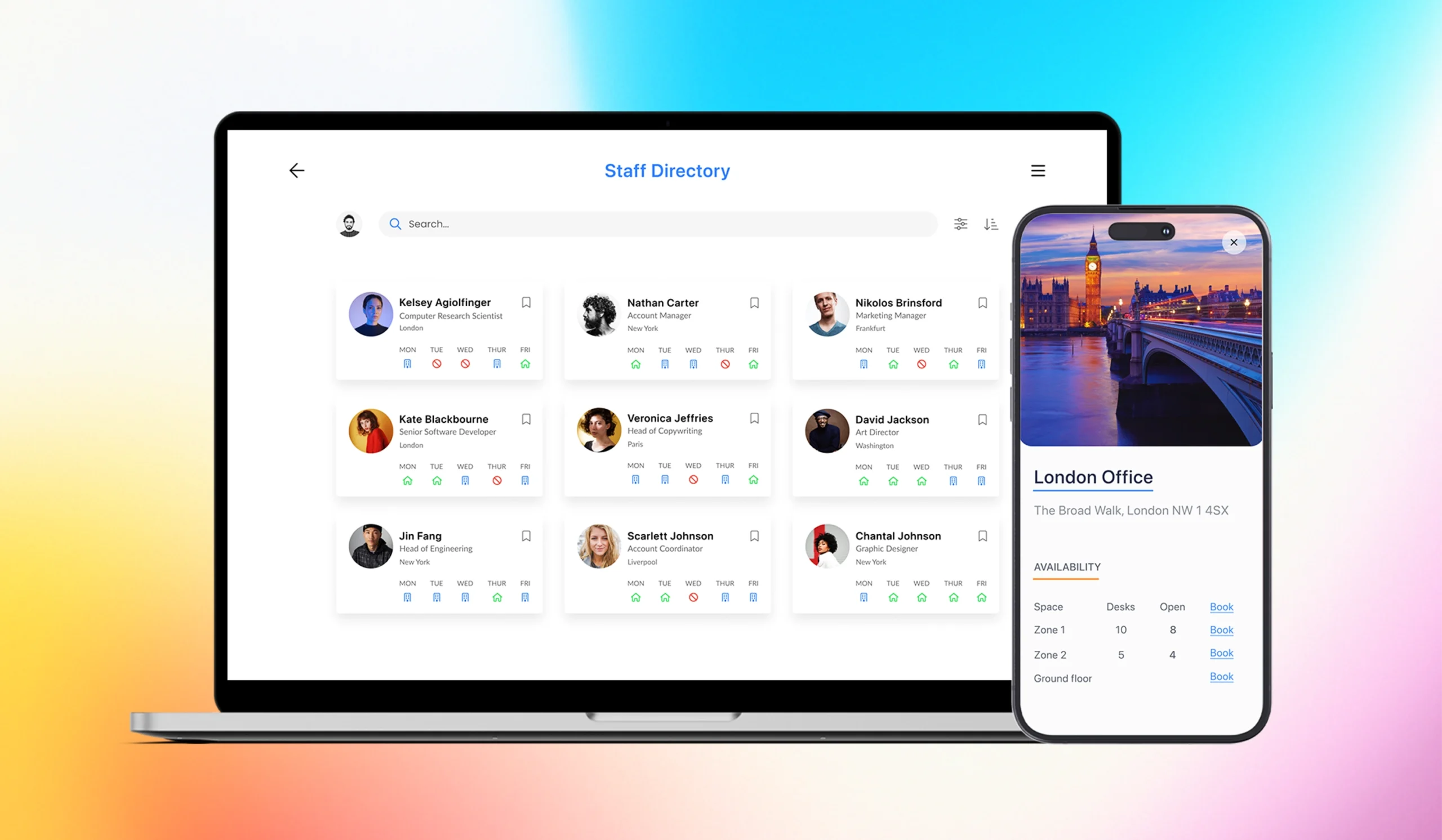
Fliplet helps teams make hybrid work feel consistent by giving them a secure, branded employee experience that works on web and mobile. Instead of forcing people to jump between disconnected tools, you can bring the key hybrid-work journeys into one place and evolve them over time.
Here are some of the most useful capabilities for hybrid teams:
- Targeted communications for role/location-based updates, with notifications when it matters
- Employee directory so people can find the right contact quickly (especially across locations)
- Searchable resources for policies, playbooks, and FAQs with clear ownership and review cycles
- Remote + office coordination like desk/attendance experiences when your workplace model needs it
- Forms and workflows for IT and facilities requests, plus lightweight approvals and status updates
- Security and integrations so access is governed and your existing systems remain the source of truth
If you want a starting point, explore Fliplet’s Remote and office management solution and tailor it to your rollout.
For proof from a hybrid-office rollout, see how Macfarlanes used Fliplet to support return-to-office coordination and employee communications.
A practical rollout plan (30–60–90 days)
Modernizing for hybrid work is not a single “big launch”. The best results come from quick wins followed by a predictable expansion.
Days 1–30: Establish the employee hub
Focus on adoption and trust.
- Build a small set of must-have pages: news, policies, directory, key contacts
- Add the top 5–10 FAQs that generate repeated questions
- Create an “Office day checklist” and a “Remote day checklist”
Days 31–60: Add high-frequency requests
Focus on reducing time-to-resolution.
- Launch facilities and IT request flows with clear ownership and status updates
- Introduce lightweight approvals where decisions currently happen in email threads
- Add targeted notifications for time-sensitive updates
Days 61–90: Automate, integrate, and measure
Focus on reliability and scale.
- Integrate with your core systems (identity, HR, ticketing, knowledge where applicable)
- Expand content ownership to departmental editors with guardrails
- Track adoption, request resolution time, and content findability
Use cases that make the biggest difference
If you are deciding where to start, these use cases usually deliver the fastest impact:
- Leadership communications that are consistent across office and remote staff
- A searchable policies hub with clear ownership and review dates
- Employee directory and “who to contact” guidance (especially for distributed teams)
- IT and facilities requests with status visibility (no more chasing)
- Onboarding journeys that work regardless of where a new hire starts
How to know it is working
Hybrid work initiatives can feel intangible unless you define outcomes. Start with a small set of practical metrics:
- Weekly/monthly active users of the hub
- Time to find key policies (or reduction in repeated questions)
- Request resolution time for IT/facilities workflows
- Office-day readiness (fewer “where do I go / what do I do” questions)
- Engagement with critical updates (reads, acknowledgements, completions)
Ready to modernize hybrid work?
If you want to reduce hybrid friction without rolling out yet another disconnected tool, a remote office management experience can unify communications, office coordination, and workflows in one secure place.
Explore what this could look like for your organization and book a demo with Fliplet.

Lisa Broom is the Head of Marketing at Fliplet, where she helps enterprise teams turn complex workflows into secure, user-friendly digital experiences.
Ready to see Fliplet live?
Build the software you actually need.
Book a demo to walk through your workflow goals, governance requirements, integration needs, and rollout model.