
If you want the most effective team possible, getting the right communication tools is essential. The search for the best team communication apps can feel overwhelming with so many options out there. But don't worry! This guide is dedicated to helping you navigate the sea of communication tools, highlighting those that stand out in terms of features, user-friendliness, and overall impact on team collaboration.
With the shift towards remote and hybrid work models, trying to get a good chat for business app is extremely critical. The right one can bridge the gap between team members scattered across different locations, keeping everyone in the loop.
But it's not just about functionality. These group messaging apps also prioritize user experience, ensuring that their platforms are intuitive and accessible for everyone on your team, regardless of their tech-savviness. That's important, because these apps are, for many of us, the new workplace.
In this guide, we'll dive deep into the features that set these communication tools apart, explore how they can fit into your business operations, and provide you with the insights you need to make an informed decision.
List of the best team communication apps to chat for business
There are many team communication apps available in the market, each with their own unique features and functionalities. Here are the examples we have researched:
- Fliplet
- Chanty
- Troop Messenger
- Pumble
- Google Chat
- Microsoft Teams
- Slack
- Flock
- Zoom
- Basecamp
- Trello
- Monday.com
- Twist
- Connecteam
- Ring Central
These team communication apps offer different features such as instant messaging, video conferencing, project management tools, file sharing, and more. Organizations can choose the app that best suits their needs and budget.
If you are looking to better your internal communication read this white paper.
What are team communication apps?
Team communication tools have become an essential part of modern work culture, especially for remote teams. These tools help team members work efficiently and streamline the workflow of an organization.
Team members can have virtual daily meetings, collaborate on projects, and share feedback in real-time. This makes it easier to stay connected, even if you are not in the same location. Virtual meetings can save time and improve productivity by reducing the need for long email threads or time-consuming in-person meetings.
By using team communication tools, organizations can achieve better collaboration, improve communication, and ultimately achieve their goals more efficiently.
The importance of team chatting apps for the workplace
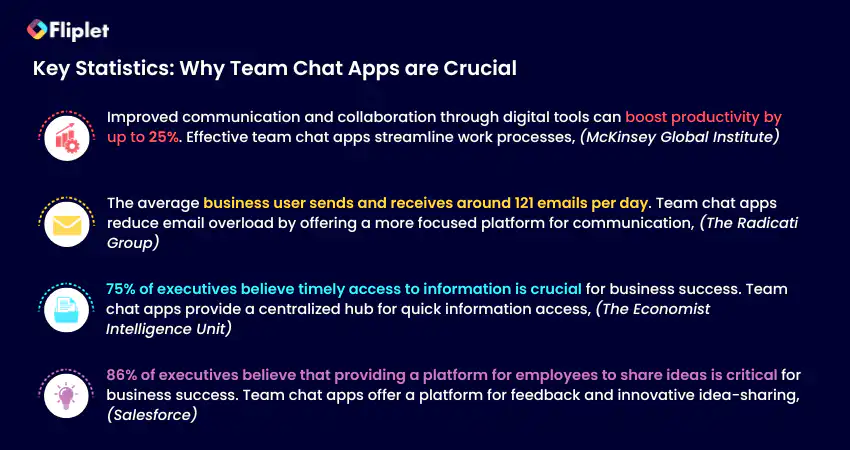
The benefits of group chat apps
Team communication apps have emerged as the go-to solution for many organizations, offering a centralized platform for teams to communicate, collaborate, and manage tasks and projects.
Whether you are a company executive, an individual contributor, or a member of a team, the benefits of team communication apps are numerous and significant.
Benefits to the company:
- Increased productivity and efficiency due to streamlined communication and collaboration.
- Better organization and management of tasks, projects, and resources.
- Improved team engagement and morale, leading to higher employee retention rates.
- Enhanced security and data protection through secure messaging and file sharing.
- Cost savings
Benefits to the individual:
- Increased flexibility and autonomy in work due to remote work options.
- Improved work-life balance and reduced stress from having more control over work schedule.
- Better work satisfaction from improved communication and collaboration with team members.
- Enhanced professional development opportunities through access to learning resources and training materials.
- Increased motivation and accountability due to clear communication and goal-setting.
- Easier to reference back to meetings and files when they need to.
Benefits to the team:
- Better communication and collaboration among team members, leading to improved teamwork and productivity.
- Enhanced creativity and innovation through increased collaboration and idea-sharing.
- Improved problem-solving abilities through access to a wider range of ideas and perspectives.
- Greater sense of community and team spirit, leading to higher levels of engagement and job satisfaction.
- Better project management and task delegation, leading to improved outcomes and higher-quality work.
How Do Team Communication Apps Work?
Team communication apps work by providing a centralized platform for team members to communicate, collaborate, and manage tasks and projects in which team members can access information from anywhere with an internet connection.
Team communication apps typically offer a range of communication tools, such as instant messaging, voice and video calls, and virtual meetings, which allow team members to communicate in real-time.
Many team communication apps also offer project management tools, including task assignment, progress tracking, and deadline management, which help teams stay organized and on track.
One of the key features of team communication apps is their ability to integrate with other productivity tools and software, such as project management software, email clients, and calendar apps. This integration allows team members to easily access all the tools they need from a single platform, reducing the need to switch between different apps and improving overall efficiency.
The different types of business chat apps
When it comes to team communication, there are several types of apps that teams can use to stay connected and collaborate effectively.
- Instant Messaging and Chat Apps: These apps allow team members to communicate in real-time via text-based messages, voice, and video calls.
- Video Conferencing Apps: These apps facilitate virtual face-to-face meetings and video calls with team members, clients, or partners.
- Project Management Apps: These apps enable team members to collaborate on projects, track tasks, assign responsibilities, and share progress updates.
- File Sharing and Collaboration Apps: These apps enable team members to share, edit, and collaborate on documents, spreadsheets, and other files in real-time.
- Hybrid Apps: These apps combine features from different categories to offer a more comprehensive communication and collaboration experience.
So, now we understand the different types of team communication apps that are available, let's dive in and explore the world of communication apps that will elevate your team's collaboration and productivity to new heights!
For more on building a custom app, read our blog.
The 16 best team communication apps: Reviews & App Overview
With so many team communication apps available in the market, it can be challenging to choose the right one. That's why we have done all the hard work for you.
Best Overall Group Chat Apps
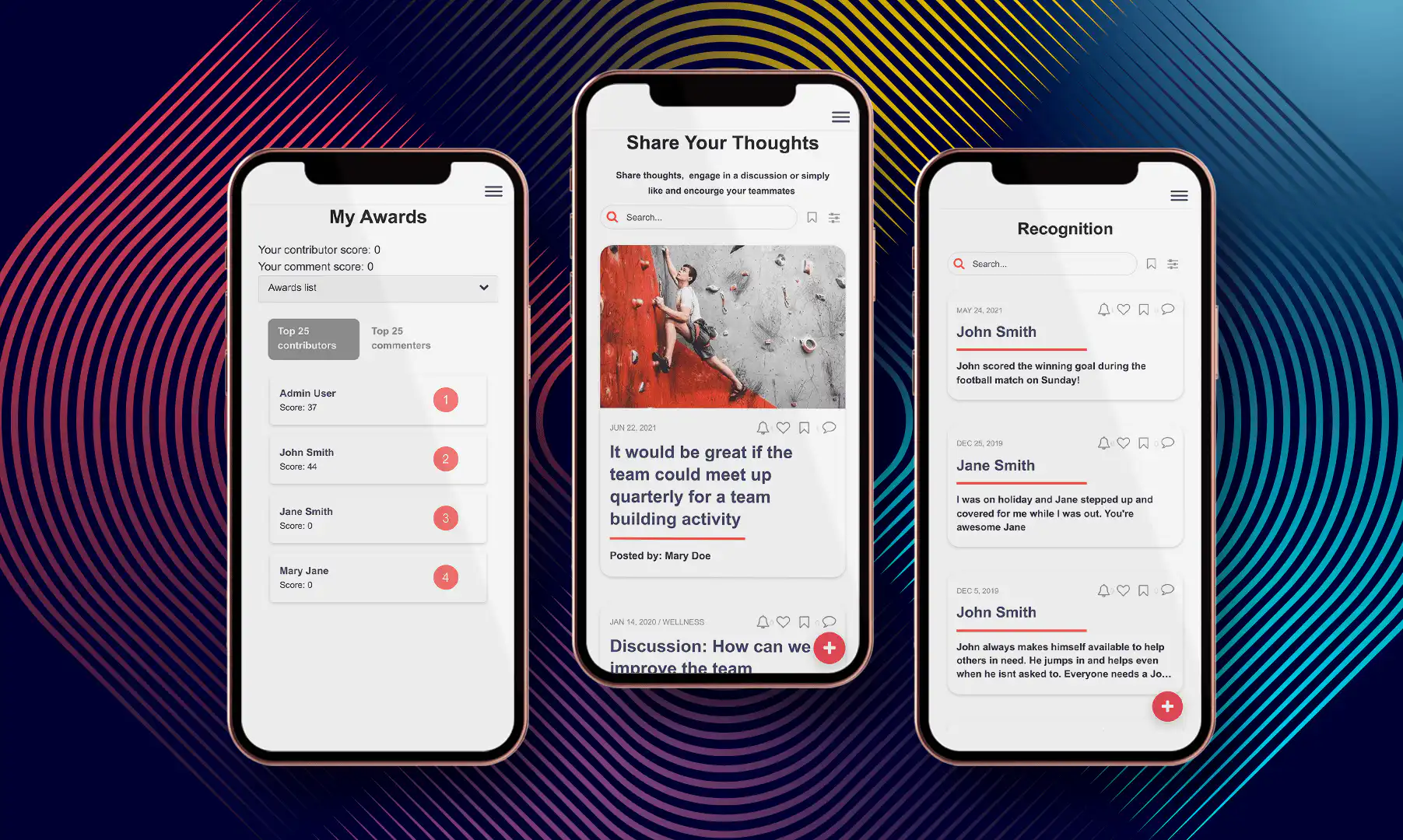
Analysis
If your organization is seeking a communication app that truly delivers, then Fliplet should be your choice. Fliplet stands out as a game changer for communication apps, offering extreme customization that allows it to solve communication challenges. Traditional communication apps are often limited in their functionality, providing users with a restricted set of channels through which to communicate and interact.
Consequently, communication tends to occur in isolation from other areas of the business, making collaboration and information sharing cumbersome. Consider the experience of your customer success team when faced with a customer complaint that requires IT support. The communication process can become painful and inefficient, as different individuals work in different channels and have access to different information.
Fliplet, however, takes communication apps to a new level. Rather than providing a stand-alone app for communication, Fliplet offers a comprehensive suite of prebuilt screens that can be customized to meet your organization's specific needs. While Fliplet does offer an off-the-shelf solution that users can plug-and-play, the platform allows you to extend the platform to match your specific needs. All that with ZERO coding. This versatility is made possible by the diverse array of ready-to-use screens that Fliplet provides and allows you to adjust to your needs. How is this helpful?
For instance, if your organization wishes to add an inventory tracking screen to your communication app to keep your sales team up-to-date, then you can do that with just a few clicks. At the same time if you require a folder within the app that houses all your company contract templates, Fliplet can also accommodate such needs. Fliplet's unique features and user-friendly interface make it the ideal choice for organizations seeking to streamline their communication and enhance collaboration across teams.
But even Fliplet's standalone Communication App Solution is better than any other in the market. Their Communications solution is an all-in-one app that brings together all the necessary tools for transparent communication and engagement. With Fliplet, collaborative conversations, news updates, and tools are all housed within one app, making communication across your network simple and effective.
One of Fliplet's standout features is their gamification feature, which incentivizes users to interact within the app through points and badges. This makes the app experience more engaging and fun for team members, while also improving communication and motivation.
Fliplet's chat app is also a standout tool for team collaboration. With real-time messaging and group chats, teams can easily share ideas and stay on top of their work, no matter where they are.
What makes Fliplet stand out from the other communication apps? Its advanced customization feature. Fliplet offers the flexibility to create a personalized team communication app that caters to the specific requirements of your team. You can customize the branding, features, and functionalities. This, in turn, leads to a more streamlined and productive communication system for your organization.
Overall, Fliplet provides an exceptional team communication app experience that fosters collaboration, engagement, and productivity.
What can Fliplet's communication solution be used for?
Fliplet's communication solution can be used for a variety of team communication purposes, including department or company communication, project communication for both small and large, event communication, group communication and community communication. Read how we compete with other community apps.
No matter the purpose, Fliplet provides a comprehensive solution that allows teams to engage in transparent and effective communication, promoting collaboration and productivity. With Fliplet, all of your team communication needs can be met in one convenient and user-friendly platform.
Key Features
Live chat
Gamification
Newsfeed
Polls & Surveys
File sharing
Limitations
"Took a little bit of persistence to get started, but now feels very familiar and productive." Read the full review.
Price
Free plan – publish your own web app
Public plan – from $9.90 p/m
Enterprise plan – have a demo with us
Supported Platforms
iOS, Android, Windows, macOS, and Web
Reviews
Capterra – 4.8 / 5
G2 – 4.6 / 5
Summary
Organizations use Fliplet for their team communication app because of the flexibility, the ease of use, the proven use cases, the support for teams, the security and the cost advantage.
2. Slack
2. Slack
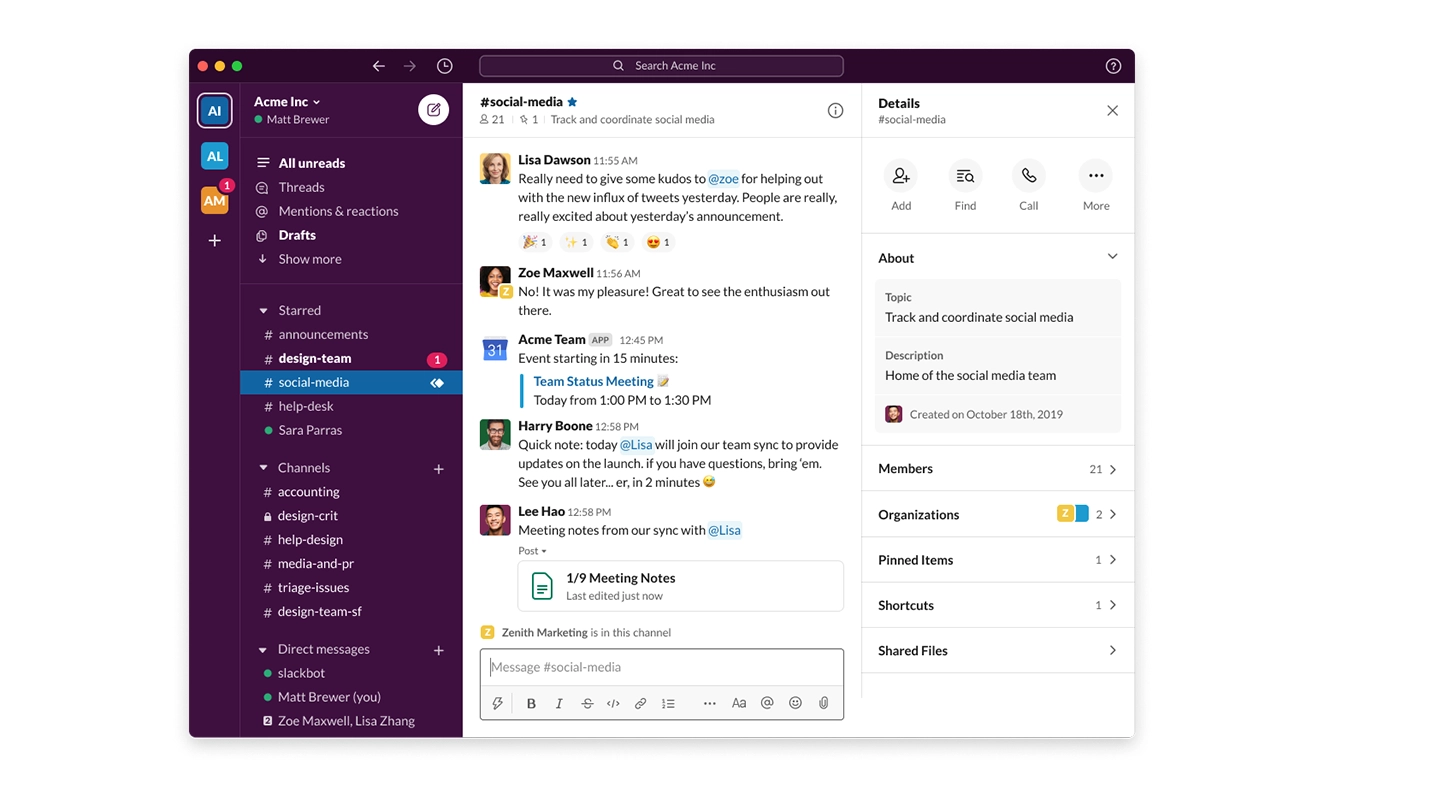
Analysis
Slack is a popular team chat app that many teams around the world rely on to enhance communication and productivity, featuring instant messaging capabilities as well as support for file-sharing and automatic syncing across multiple devices.
What We Like:
- Informality: If your organization is not very formal and our culture is more fun and vibrant then slack is great as it enables you to share emojis, react to others messages and share gifs. This is a great way to spark conversation between the members of the team.
- Easy to use: Slack is very easy to use and you can get started on it straight away.
- New features: Slack is good at listening to their customers and adding new features based on what the customers want and require. They are often adding new features to the platform.
Key Features
Video huddles
Integrations
Chat channels with internal or external teams
Limitations
Users cannot access Slack's desktop app without an internet connection, making it difficult to work offline.
Price
Free plan
Standard: $6.67 per user per month
Plus: $12.50 per user per month
Enterprise Grid: Pricing varies based on the organization's needs and size.
Supported Platforms
iOS, Android, Windows, macOS, Linux, and web
Reviews
G2: 4.5/5
Capterra: 4.7/5
Summary
Slack is a versatile collaboration platform that accommodates any profession, with easily searchable conversations and compatibility with many commonly used tools and services. It is more of an informal chat app compared to others.
3. Microsoft Teams
3. Microsoft Teams
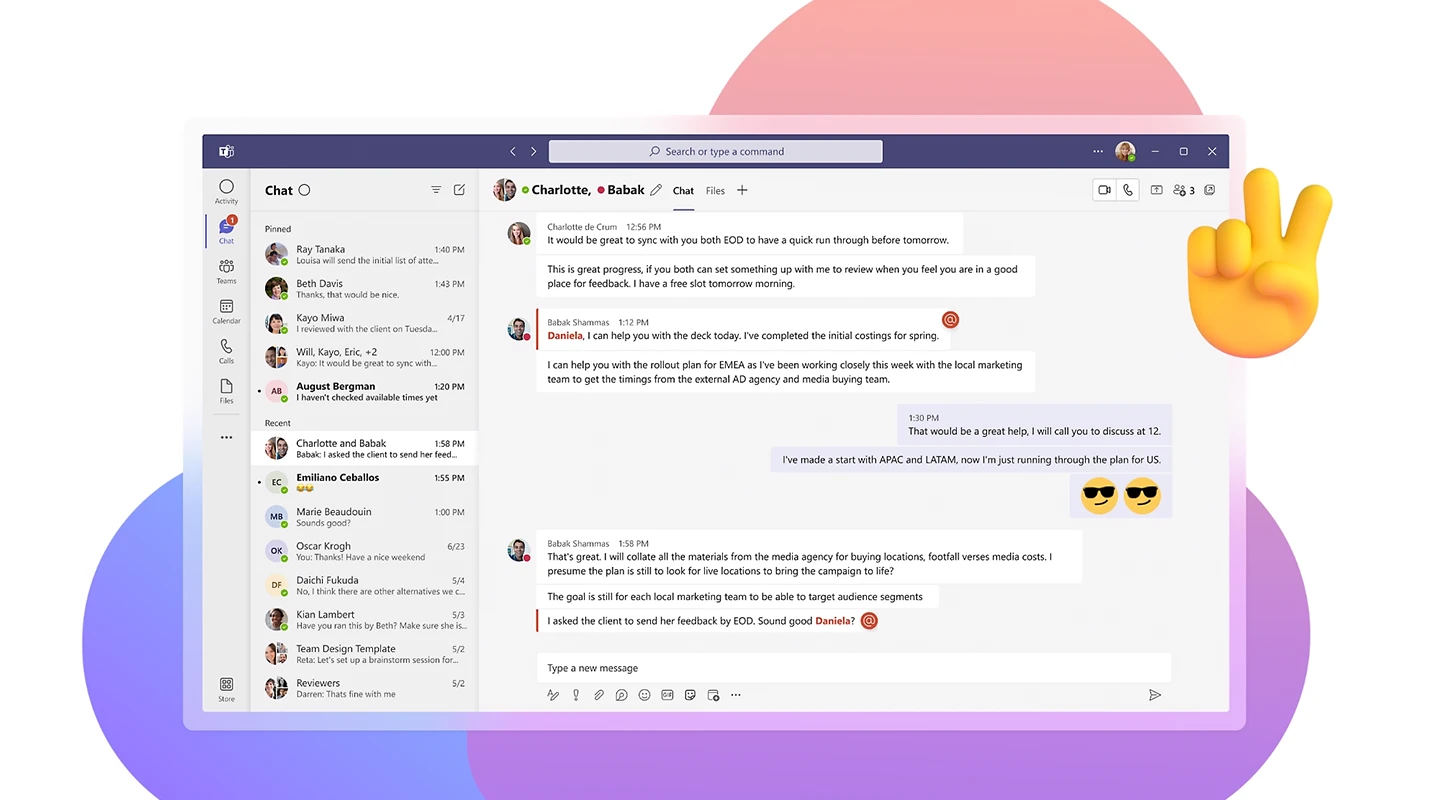
Analysis
Microsoft Teams is the ultimate messaging app for your organization – a workspace for real-time collaboration and communication, meetings, file and app sharing, and even the occasional emoji. All in one place, all in the open, all accessible to everyone.
Key Features
Instant messaging
Have conversations internally and externally
Integrations
Limitations
The number of channels is limited to 200 public and 30 private channels per team. Although this may not be a problem for smaller organizations, others can find themselves in a tight spot.
Price
Microsoft Teams Essentials: $4.00 user/month
Microsoft 365 Business Basic $6.00 user/month
Microsoft 365 Business Standard: $12.50 user/month
Supported Platforms
Windows, macOS, iOS, Android, Linux
Reviews
G2: 4.3/5
Capterra: 4.5/5
Summary
Microsoft Teams is a communication and collaboration platform that offers features such as chat, audio and video calls, file sharing, and integration with other Microsoft apps to enhance teamwork and productivity.
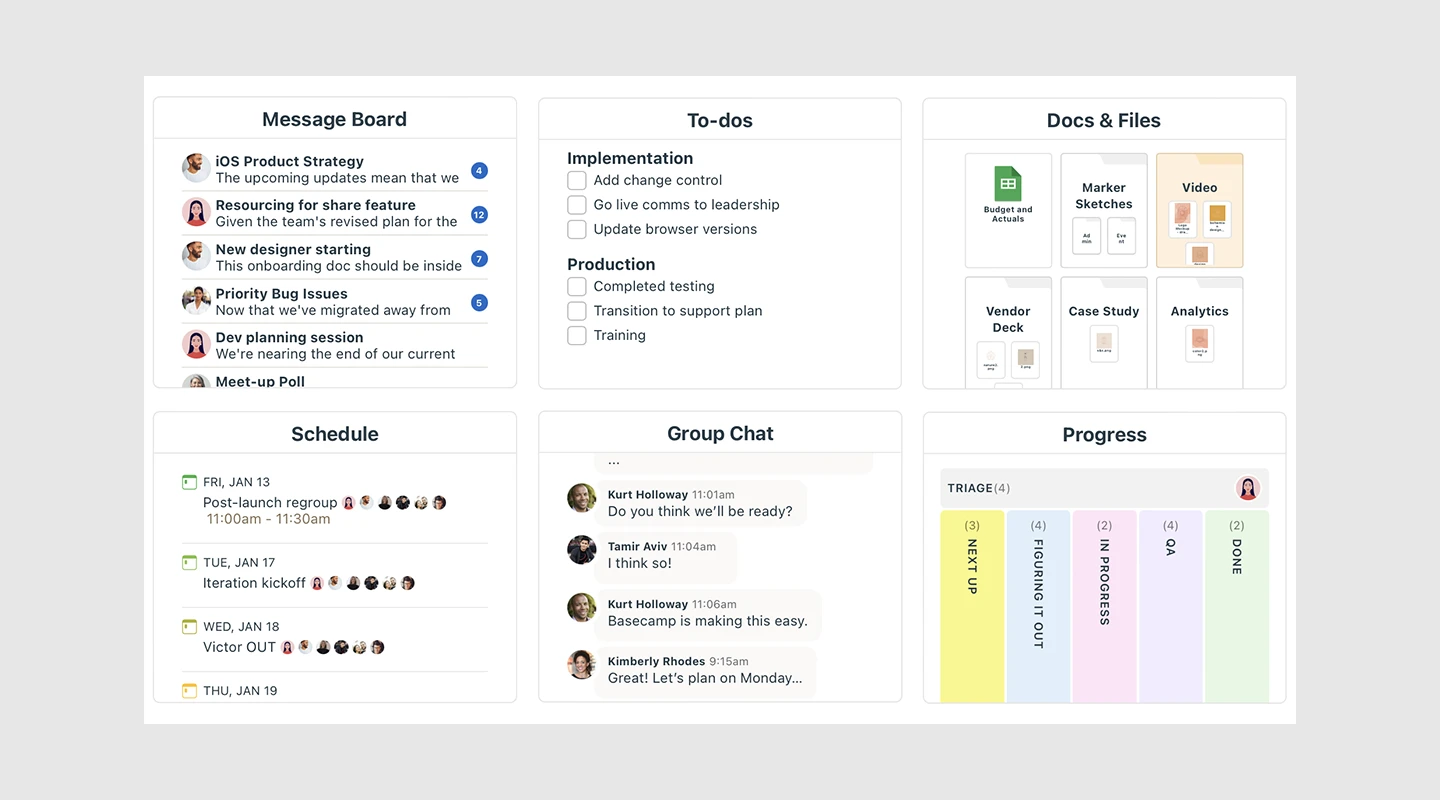
Analysis
Basecamp is an all-in-one platform for project management, collaboration, and communication, designed to streamline work by eliminating the need for back-and-forth communication, time-consuming status meetings, and the use of multiple apps.
Key Features
Message board
To do lists
Document sharing
Limitations
The non-customizable flat rate of Basecamp's pricing may not be suitable for smaller teams as it includes features that may not be necessary for their needs.
Price
Basecamp pricing is based on a flat rate, regardless of the number of users, and starts at $99 per month.
Supported Platforms
Android, iOS, Web
Reviews
G2: 4.1/5
Capterra: 4.3/5
Summary
Basecamp works because it's the easiest place for everyone in every role to put the stuff, work on the stuff, discuss the stuff, decide on the stuff, and deliver the stuff that makes up every project.
5. Trello
5. Trello
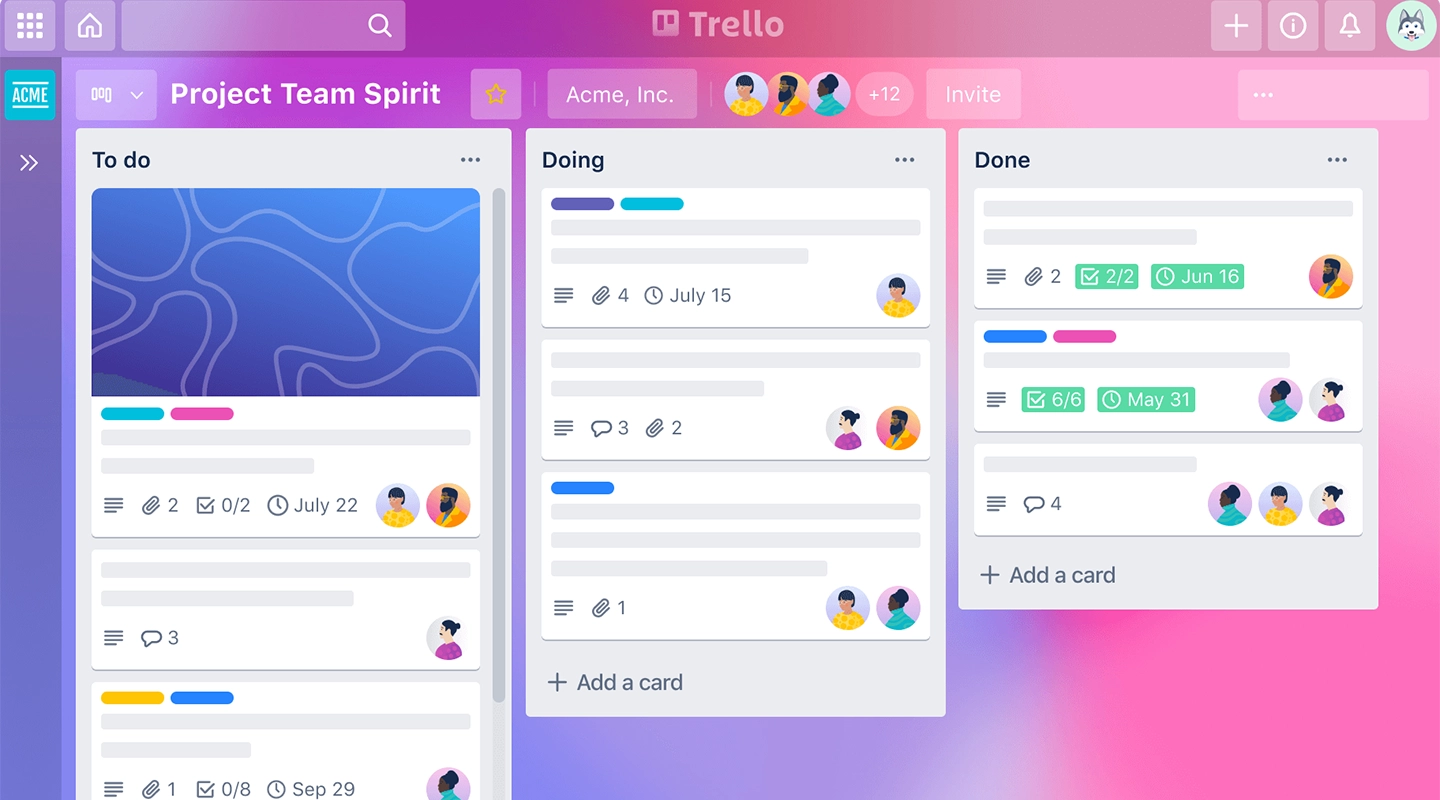
Analysis
Trello is a popular team collaboration and project management app that allows teams to easily organize and prioritize their work. Trello enables users to create and manage tasks, assign team members, set deadlines, and track progress in real-time.
Key Features
Boards
Cards
Integrations
Limitations
One of Trello's limitations is that it can become cluttered and less intuitive for larger, more complex projects.
Price
Free plan
Trello Business Class: $9.99 per user per month
Trello Enterprise: Pricing varies based on the organization's needs and size.
Supported Platforms
Android, iOS, Web
Reviews
G2: 4.4/5
Capterra: 4.5/5
Summary
Trello is the ultimate project management tool. Start up a board in seconds, automate tedious tasks, and collaborate anywhere, even on mobile.
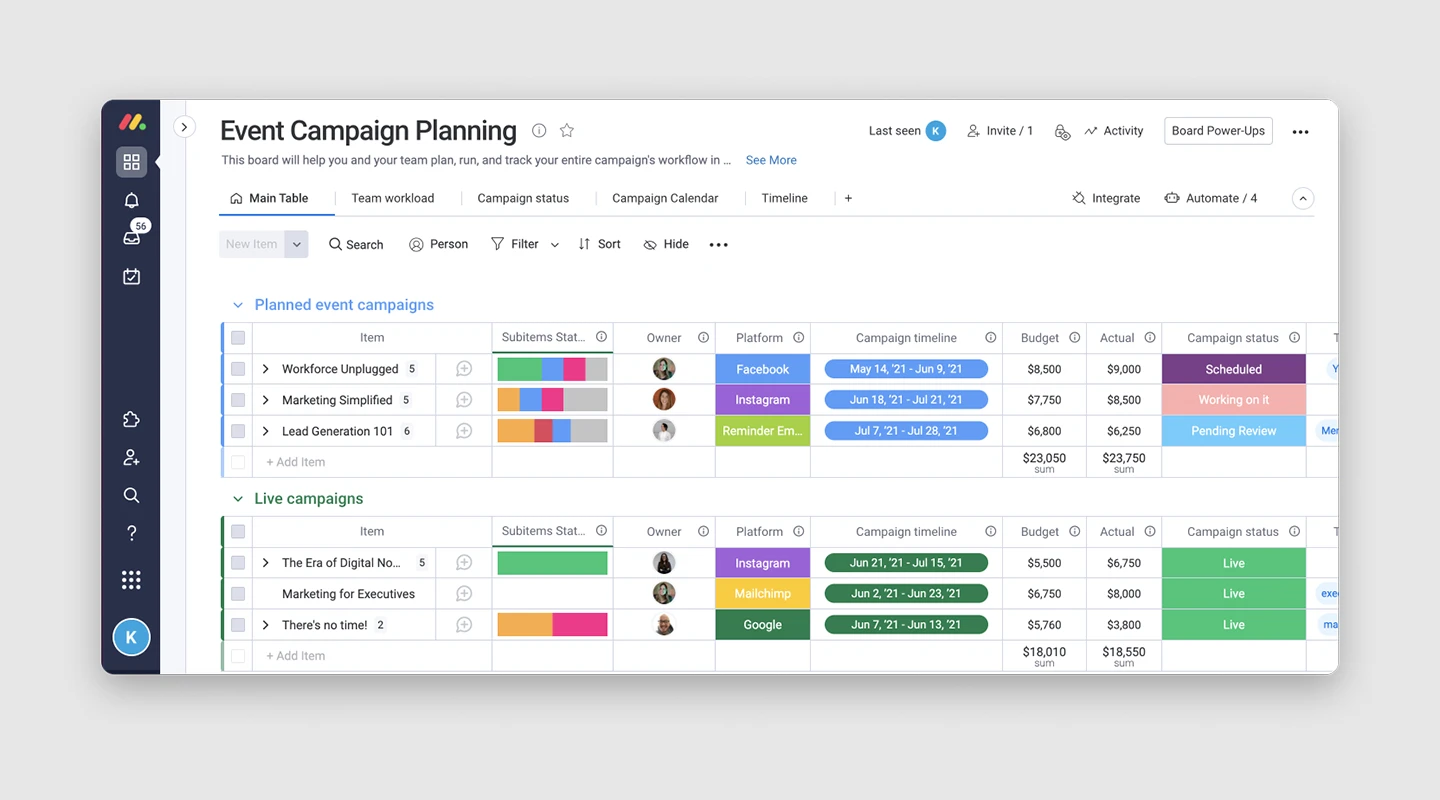
Analysis
Monday.com is a team collaboration and project management platform designed to help teams work more efficiently and collaboratively. With a highly customizable interface, Monday.com allows users to create and manage tasks, set deadlines, assign team members, track progress, and visualize data in a variety of ways.
Key Features
Dashboard
Automations
Gantt charts
Limitations
Monday.com capabilities may not be suitable for larger projects, and its limited features may not meet the needs of busy teams, leaving them seeking a more comprehensive solution.
Price
Basic: $8 per user per month
Standard: $10 per user per month
Pro: $16 per user per month
Enterprise: Custom pricing for organizations with specific need
Supported Platforms
Android, iOS, Web
Reviews
G2: 4.7/5
Capterra: 4.6/5
Summary
Boost your team's alignment, efficiency, and productivity by customizing any workflow to fit your needs.
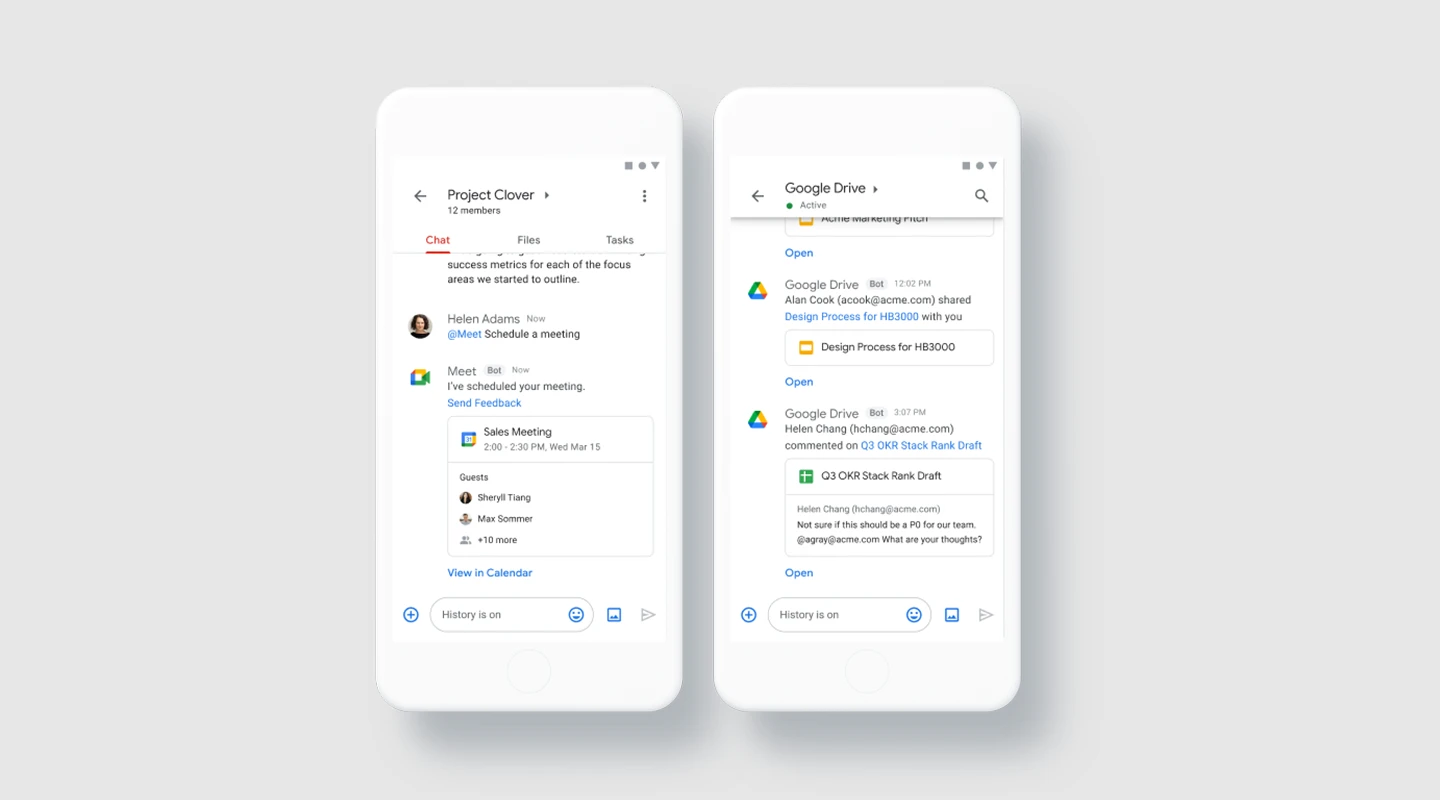
Analysis
Google Chat, formerly known as Hangouts Chat, is an excellent choice for those seeking essential communication features in a simple and organized interface. While it was previously only accessible through Google Workspace accounts, it is now available for free personal accounts.
Key Features
Chat: Google Chat offers basic instant messaging capabilities for both one-on-one and group conversations.
Rooms: Rooms in Google Chat are channels that are designed for long-term collaboration on specific projects or teams.
Meet: Google Chat includes Meet, Google's video conferencing tool.
Limitations
Users in G Suite organizations that have not yet turned on Chat won't be reachable through Chat. Users can message any external users in organizations that have Chat turned on.
Price
Free: For personal plans, but with limited features.
Business Starter: $6 per user per month
Business Standard: $12 per user per month
Business Plus: $18 per user per month
Enterprise: Custom
Supported Platforms
MacOS, Windows, Chrome OS, Ubuntu, Linux.
Reviews
G2: 4.6/5
Capterra: 4.5/5
Summary
Google Chat offers basic instant messaging capabilities. It has a clean and organized interface suitable for both personal and business use.
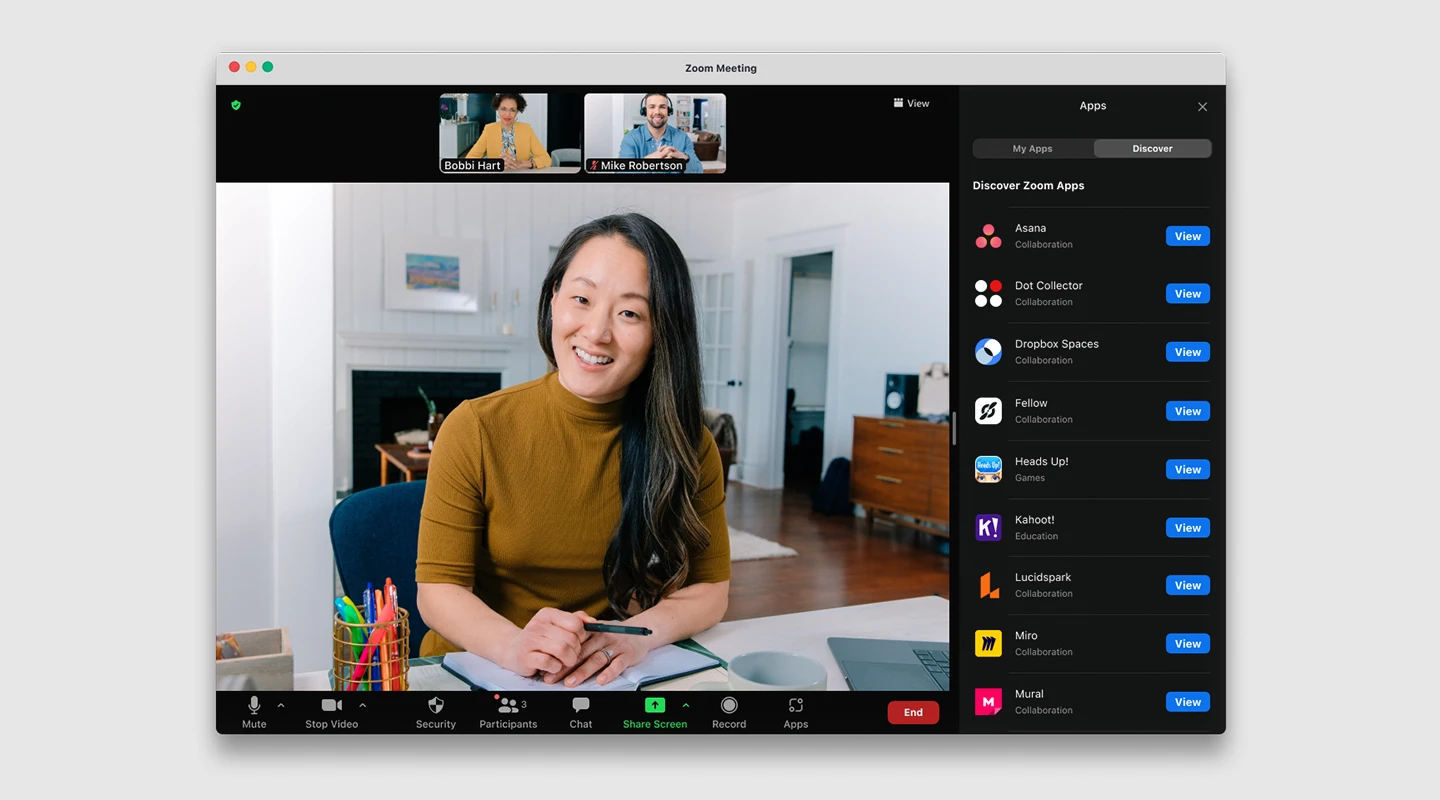
Analysis
Zoom is a popular choice in the virtual communication world, thanks to its user-friendly interface and innovative features that centralize team communication by combining video conferencing and chat. Unlike other communication platforms that subdivide communication into multiple branches, Zoom keeps it simple with just two options – chat and calls.
Key Features
HD video
Record and transcribe meetings
Screen sharing
Limitations
Both Zoom free accounts and Pro accounts are limited to 100 participants maximum. If you have a paid Business account, you can have meetings that include up to 300 participants, and with an Enterprise account, that number jumps to 500.
But unless people are sharing devices, Zoom closes the virtual door on additional people who want to join you.
Price
Free plan
Pro: $14.99 per host per month.
Business: $19.99 per host per month.
Enterprise: $19.99 per host per month, starting with a minimum of 50 hosts.
Phone: $10 per user per month, plus usage fees.
Rooms: Starting at $49 per month per room.
Webinar: Starting at $40 per month for 100 attendees, up to $349 per month for 10,000 attendees.
Supported Platforms
Windows, MacOD, Android, iOS, Web
Reviews
G2: 4.5/5
Capterra: 4.6/5
Summary
Zoom helps consolidate communications, connect people, and collaborate better together in the boardroom, classroom, operating room, and everywhere in between.
9. Chanty
9. Chanty
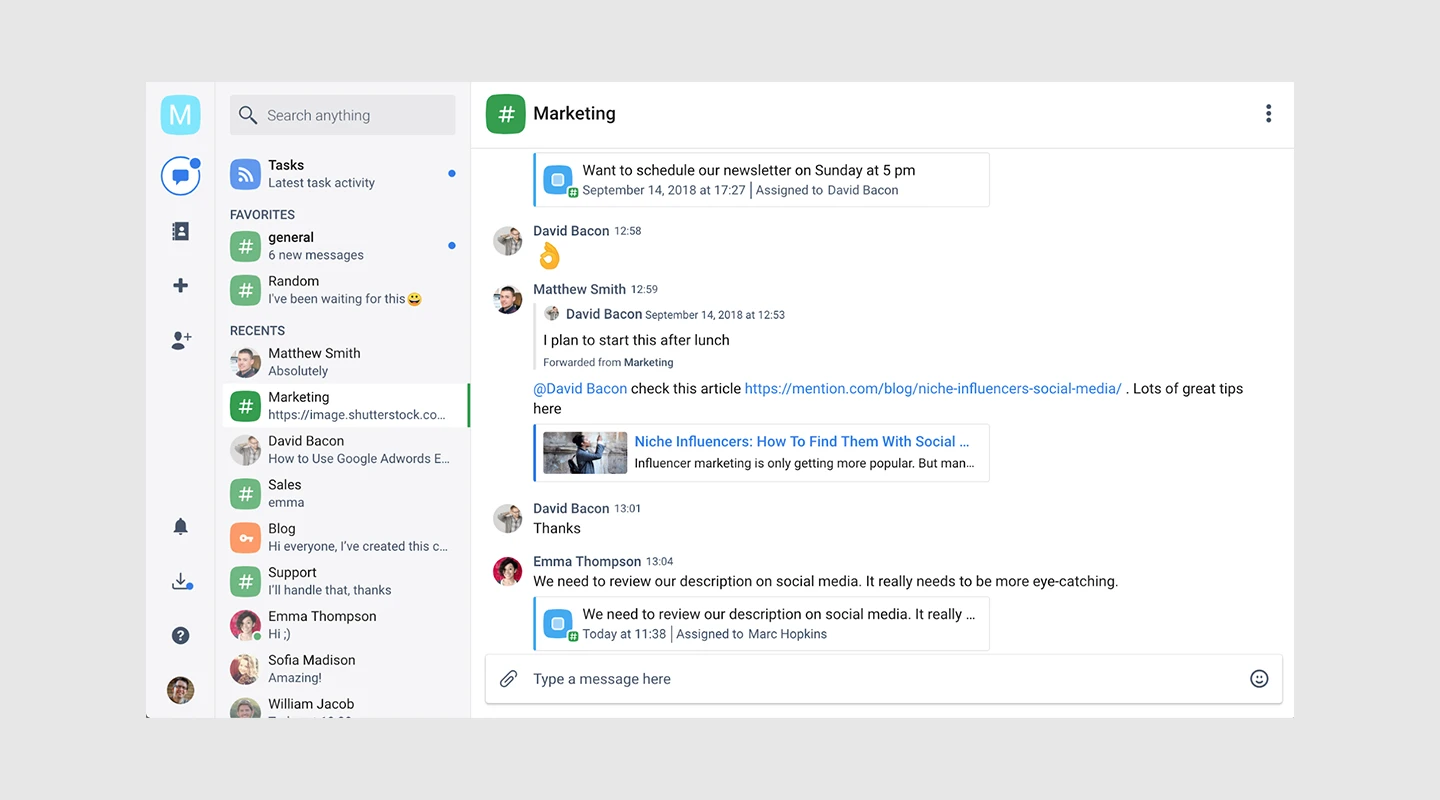
Analysis
Chanty is a user-friendly team chat application that consolidates all communication channels, including chat, audio and video calls, and screen sharing. It also offers basic project management features, allowing you to convert messages into tasks.
Key Features
Communicate through chat, audio and video
Teambook to access all your content in one place
Thread messaging
Limitations
"It offers limited integrations" Read the full review.
Price
Free plan: for teams up to 10 members
Business plan: Starts at $3 per month per user
Supported Platforms
iOS, Android, Windows, macOS, and Web
Reviews
G2: 4.5/5
Capterra: 3.6/5
Summary
Chanty is a straightforward team chat tool designed to enhance communication and productivity for teams across all business sectors.
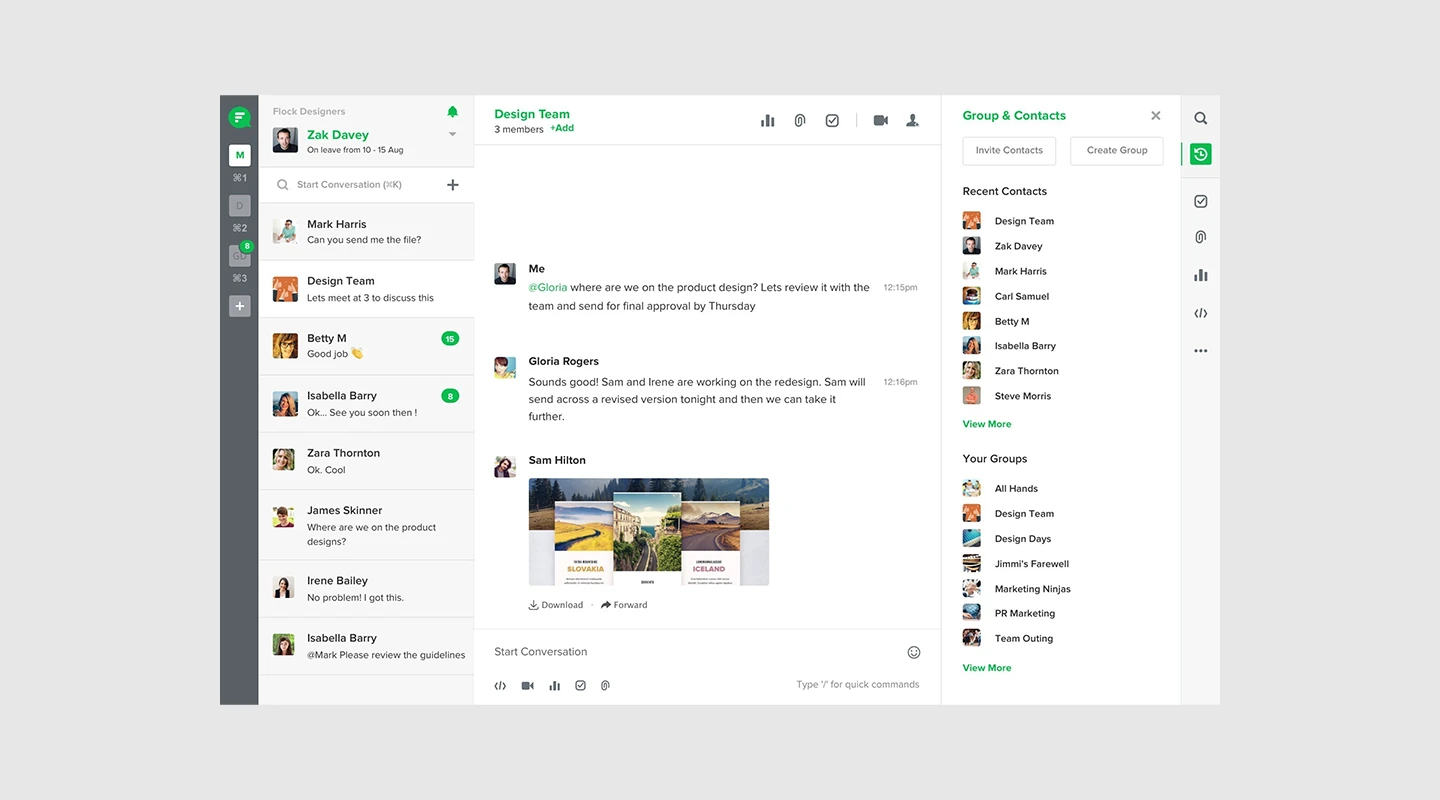
Analysis
Flock effectively streamlines all communication channels and tools in a single location, enhancing productivity and workflow. In brief, Flock is user-friendly, facilitates real-time communication, and makes collaboration seamless and straightforward.
Key Features
Team messaging
Project management
Video calls
Limitations
For the mobile application, Flock sometimes doesn't give notifications on time. So, you can miss a few alerts or messages if you are using the mobile application. Read the full review.
Price
Free plan
Pro: $4.50 /user/month
Enterprise: Contact Flock
Supported Platforms
Android, iOS, Web
Reviews
G2: 4.4/5
Capterra: 4.5/5
Summary
Flock is a comprehensive team communication and collaboration platform that centralizes communication tools and features, including advanced project management capabilities, into a single location for streamlined workflow and improved productivity.
11. Twist
11. Twist
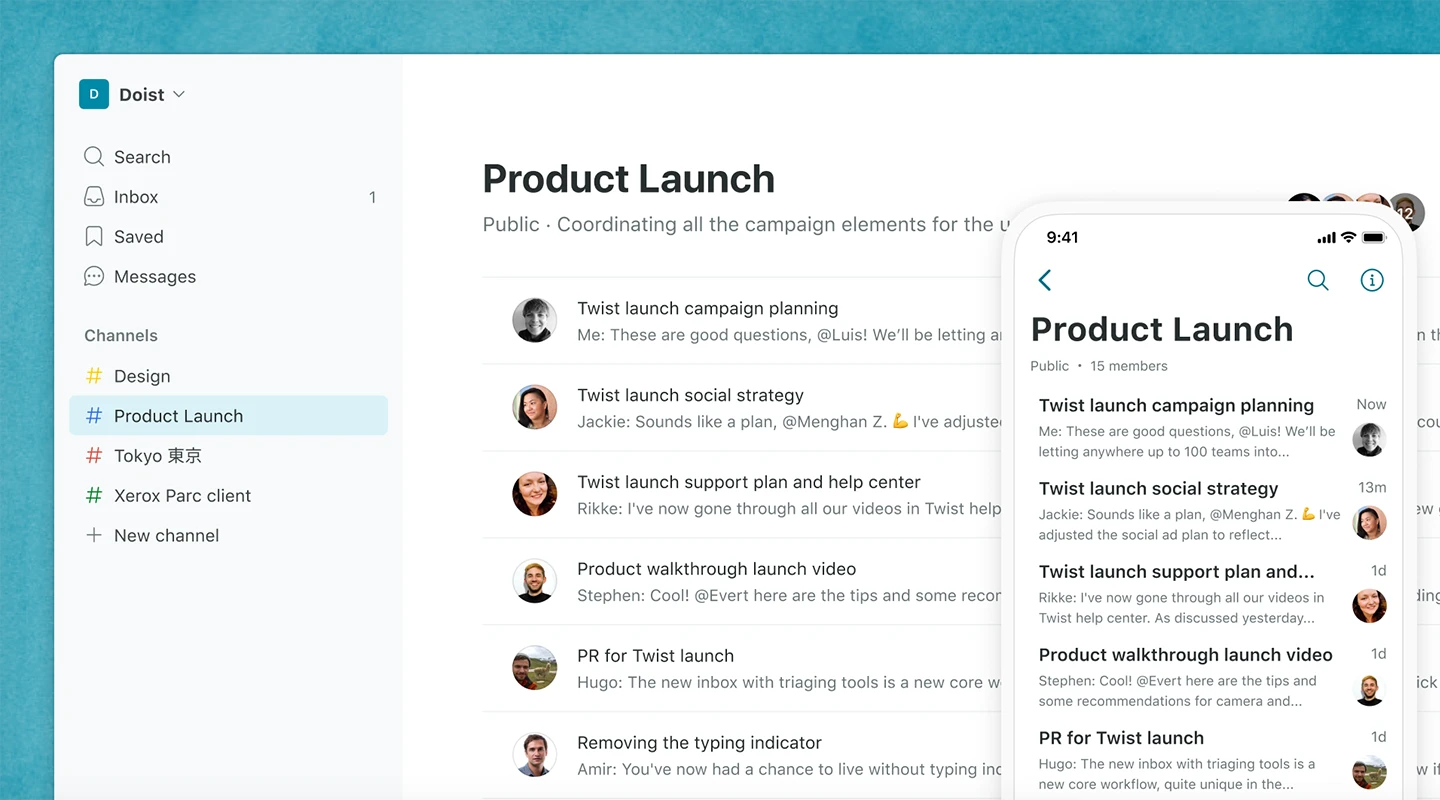
Analysis
Twist is a platform for team communication that helps to bring order to complex teamwork. The platform prioritizes collaborative conversations, with threads that keep discussions well-organized and easy to access.
Key Features
Threaded Conversations
Customizable Notifications:
Private platform with end-to-end encryption
Limitations
One limitation of Twist is that it may not be as feature-rich as some of its competitors, particularly in terms of integrations with third-party tools.
Price
Free plan
Unlimited Plan: $5 per user per month
Enterprise Plan: Custom pricing for organizations with specific needs.
Supported Platforms
Windows, macOS, and Linux, iOS, Android
Reviews
G2: 3.9/5
Capterra: 4.3/5
Summary
Twist is an async messaging app that makes collaboration easy from anywhere by using threads to organize your conversations.
Analysis
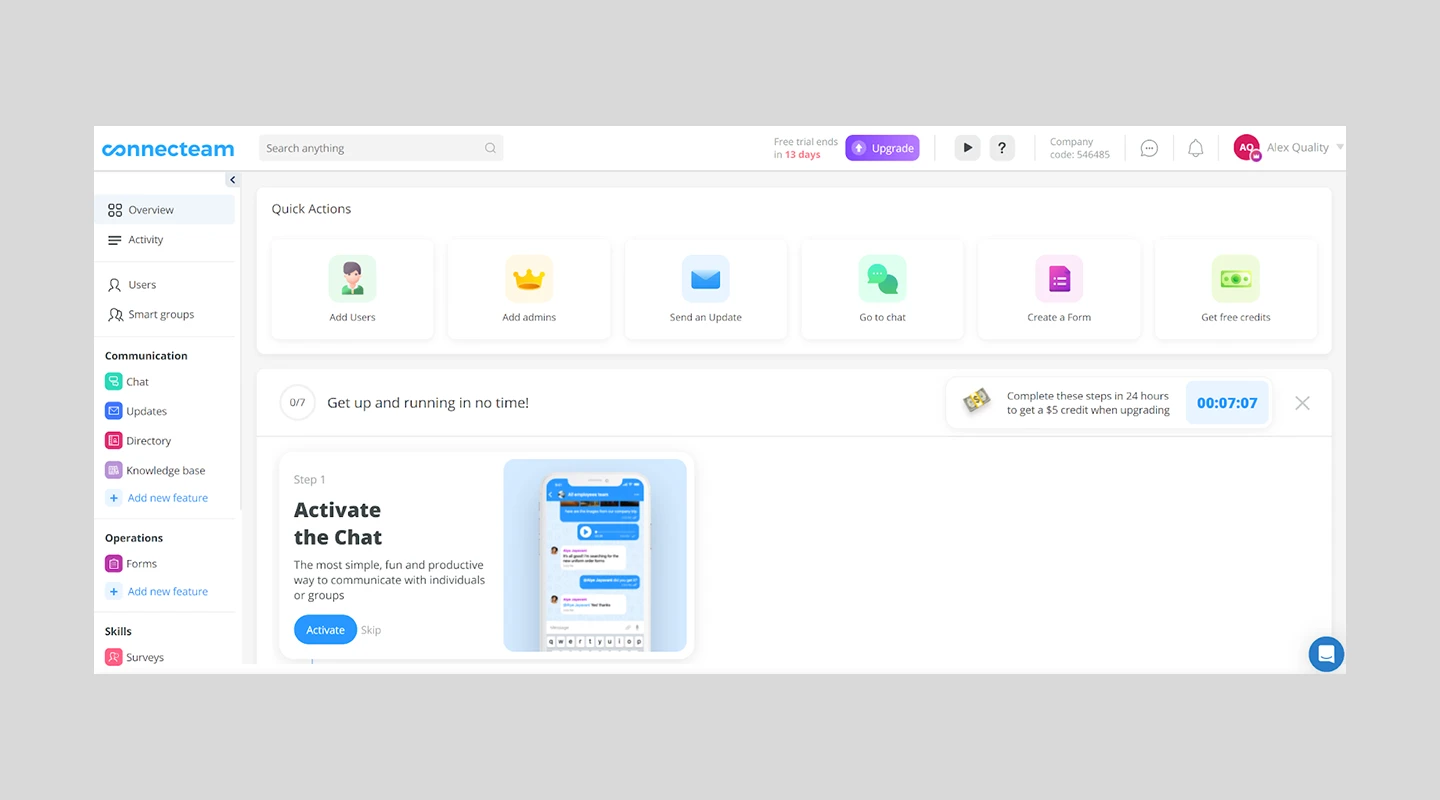
Connecteam offers an all-in-one employee management solution, including effective communication tools for businesses and teams. With Connecteam, users can access group or private chat, an employee directory, immediate updates, social posts, and other features – all within a single app.
Key Features
Employee directory
Surveys
HR suggestion box
Limitations
"The pricing is currently prohibitive for a small business. Their current platform would be extremely useful for larger businesses at its current price point" Read the full review.
Price
Free plan
Basic: $29/month for up to 200 users
Advanced: $72/month for up to 200 users
Premium: Custom pricing for larger organizations or those with specific needs.
Supported Platforms
Web, IOS, Android
Reviews
G2: 4.3/5
Capterra: 4.8/5
Summary
Businesses can easily communicate, operate and train their deskless teams, no matter where they are.
13. Troop Messenger
13. Troop Messenger
Analysis
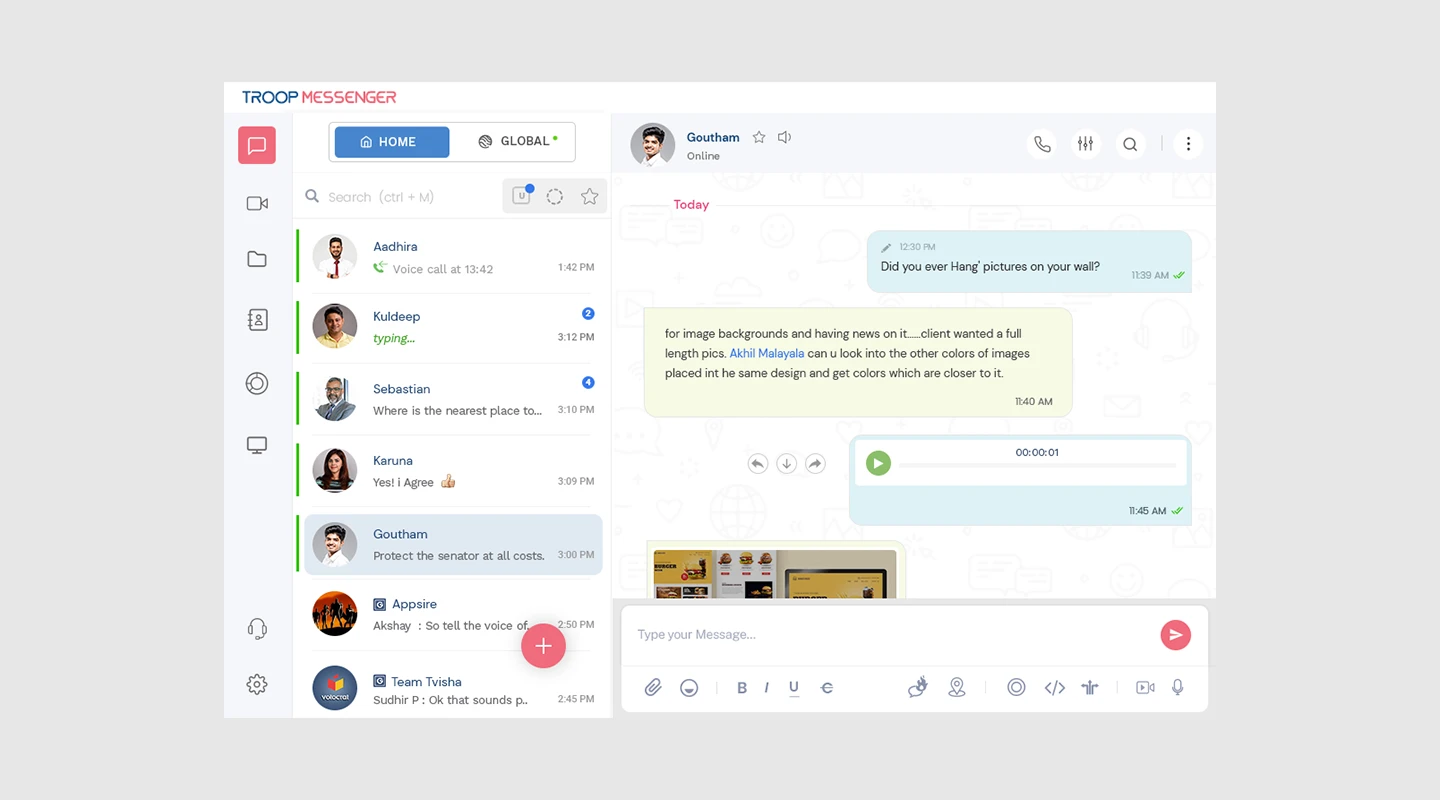
Troop Messenger unites teams and encourages collaboration through a unified interface, allowing team members of all levels to communicate via one-on-one conversations, voice and video calls, screen sharing, audio messaging, forkout, and group conversations.
Key Features
File sharing preview
Filter and favourite content
Screenshare
What We Like:
- Read missed conversations: Troop Messenger simplifies catching up with missed conversations using the unread message filter, ensuring no critical information slips through the cracks.
- Vendor collaboration: The Orange Member feature facilitates vendor collaboration, encouraging seamless communication and partnership with external stakeholders.
Limitations
"Need some updates with new features which sometimes take more loading time." Read the full review.
Price
Free plan
Premium: Starts at $1 per month per user
Enterprise: $3 per month per user
Supported Platforms
Windows, Linux, Mac OS, Web, Android, and iOS.
Reviews
G2: 4.6/5
Capterra: 4.8/5
Summary
By leveraging Troop Messenger, teams can easily share ideas, collaborate on work, and streamline projects, resulting in a more productive and promising collaboration.
14. RingCentral
14. RingCentral
Analysis
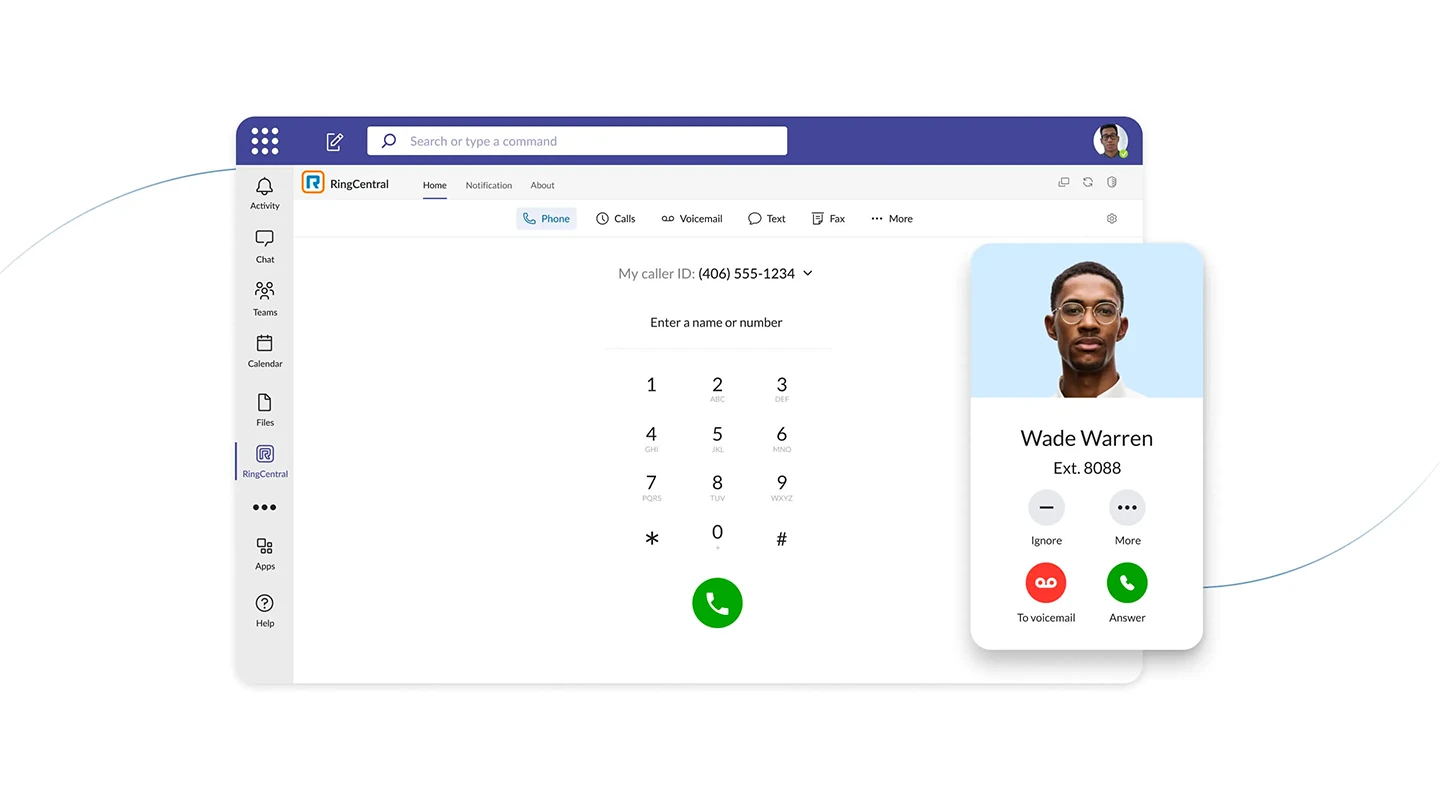
RingCenteral is a collaboration software app that prioritizes constant communication and collaboration. The app also includes team messaging, task management, and screen-sharing capabilities, allowing for effective collaboration anytime and anywhere, across multiple devices.
Key Features
Task management
Video chat
Messaging
Limitations
"Cost: The paid plans for RingCentral Video can be quite expensive, especially for small businesses or individuals. Reliance on third-party apps: While RingCentral Video integrates well with other RingCentral apps, it may require the use of third-party apps for some functions, such as recording meetings or sharing files." Read the full review.
Price
Free plan
Standard Plan: $6/user per month
Pro Plan: $12/user per month
Supported Platforms
Windows and macOS, iOS Android, Web
Reviews
G2: 4.1/5
Capterra: 4.7/5
Summary
One space for instant messaging, file sharing, video conferencing, and project management. Assign tasks and update stakeholders with built-in task management.
For. more on making an app for iPhone, read our blog.
15. Pumble
15. Pumble
Analysis
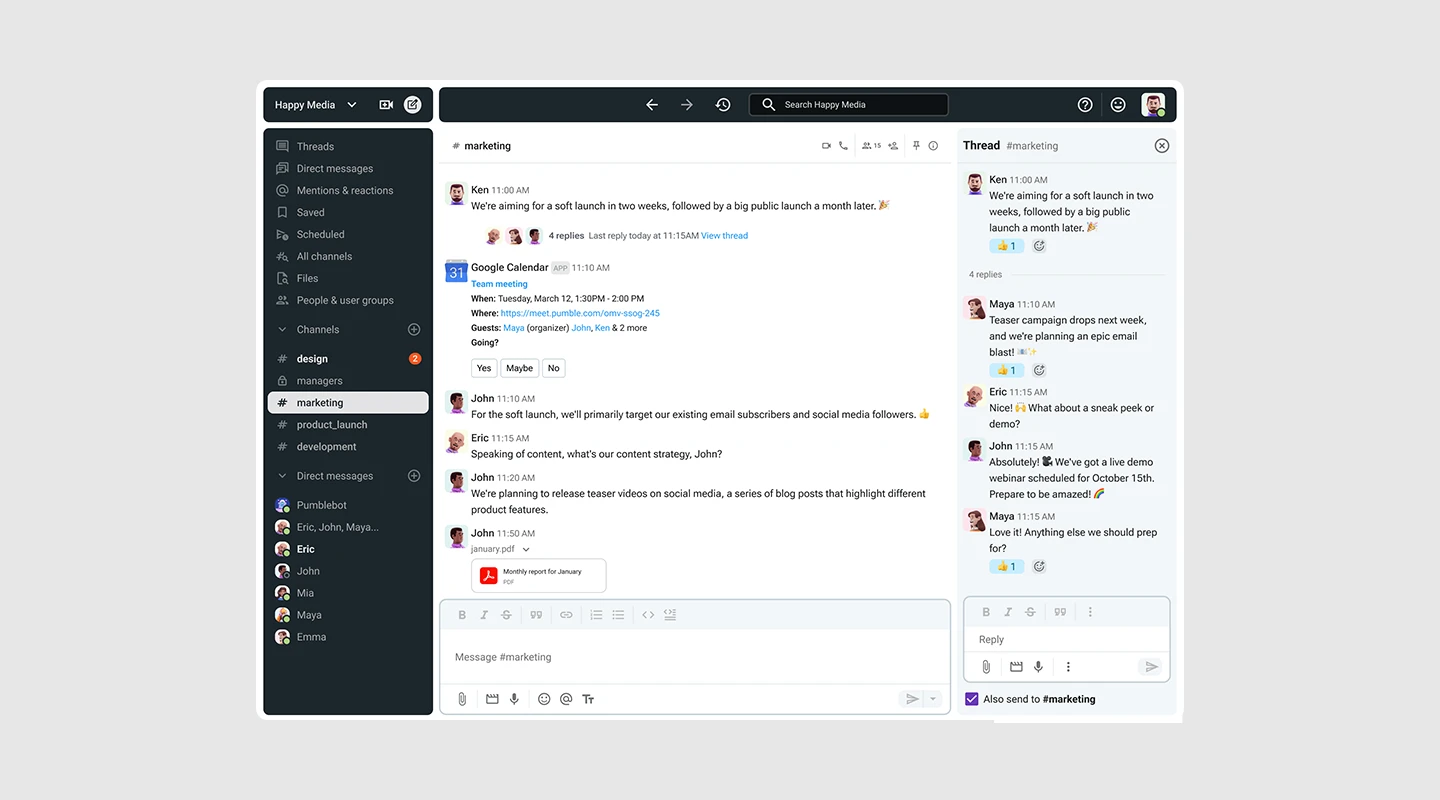
Pumble is designed for teams to reduce reliance on email, enhance productivity, and maintain constant communication among teammates. It enables seamless real-time communication both within and outside the team.
Key Features
Direct messaging
Guest access
Thread messaging
Limitations
"** The interface is a little generic and could be a bit more user friendly." Read the full review.
Price
Free plan
Pro plan: $1.99 per user per month
Supported Platforms
Windows, Linux, Mac OS, Web, Android, and iOS.
Reviews
G2: 4.5/5
Capterra: 4.7/5
Summary
Pumble lets you access all your messages so you can always refer to past conversations, links, files, etc. Search by term, filter by channel or person, and tab through matching messages, people, and files to quickly find needed info.
Analysis
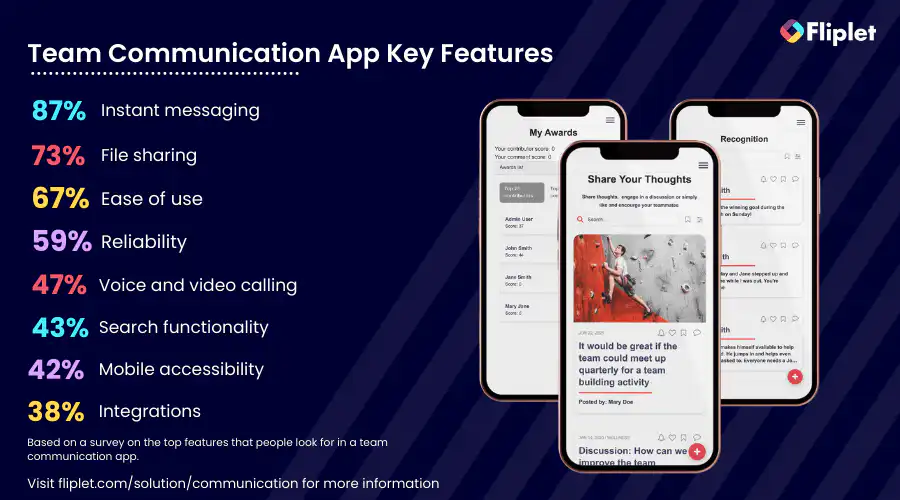
When evaluating the best workplace chat apps for your organization, it's crucial to keep these key factors in mind:
Key Features
Examine the app's key features and ensure that the features align with your team's communication and collaboration needs. Some key features you should consider include:
- Messaging: Instant messaging enables real-time communication, promoting swift information exchange, updates, and questions among team members. This encourges seamless and efficient communication within the team.
- File Sharing: The ability to easily share files, documents, images, and videos within the chat interface promotes collaboration and ensures that essential resources are readily accessible to all team members. It streamlines project work and enhances productivity.
- Administrative tools: Robust administrative features empower managers to efficiently oversee teams, delegate tasks, and share critical information, enhancing team coordination and organization.
- Group chat functionality: Group chat options allow managers to categorize discussions, ensuring topics are organized and facilitating focused team conversations. This feature improves clarity and helps manage various projects and initiatives.
- Security and privacy: Advanced security measures like encryption, multi-factor authentication, and data access controls protect sensitive conversations and files, ensuring that your team's communication remains secure and private.
- Search and bookmarking: Powerful search functionality enables quick retrieval of past conversations and files, boosting productivity by saving time. Bookmarking enables you to come back to these key files and conversations later.
- Emojis, Reactions, and GIFs: Fun elements like emojis, reactions, and GIFs add a touch of informality to discussions, promoting team bonding and improving overall communication dynamics.
- Scalability: The app's ability to accommodate your team's current size and scale as your organization grows ensures that your communication tool remains effective and relevant over time.
- Newsfeed: A newsfeed-style feature allows you to share updates and announcements with your entire team simultaneously, encouraging transparent communication and keeping everyone informed about important developments.
These features are just some of the many you may want to include. Take a look at the 16 Top Features of a Successful Mobile App.
Benefits
Assess the advantages the chat app offers, such as improved communication efficiency, enhanced teamwork, and streamlined project management. Identify how these benefits can positively impact your organization's productivity and overall workflow.
Top tip: Check out the platform's case studies and get a better understanding of how the platform has helped other organizations.
If you're at the start of your app building journey have a look at The Top 10 Best App Builders to Create a Mobile App
Common Limitations should be addressed before choosing your workplace app
Be aware of any potential limitations or drawbacks of the chat app. These may include restrictions on the number of users, limited storage capacity, or compatibility issues with certain devices or operating systems. Understanding these limitations will help you make an informed decision.
Top tip: Search for a team chat apps platform on G2 or Capterra, read the reviews and see what other users are struggling with using that application.
Price
Evaluate the pricing structure of the chat app. Determine whether it offers a free version with basic features, as well as any subscription tiers with additional functionalities. Consider your budget and how the pricing aligns with your organization's financial resources. Want to get started straight away? Start building your team chat app with Fliplet today for free.
How to choose the right communication app for your business
Having the right communication app can make all the difference in how well your team functions. With so many options out there, it can be overwhelming to choose the right one for your company's specific needs. Should you go for a standard solution like Slack or Teams? Or perhaps a custom app such as Fliplet is more suitable?
Here are some factors to consider when choosing a communication app
- Company Needs: Consider the specific needs of your company, such as the size of your team, the type of projects you work on, and the level of collaboration required.
- Features: Evaluate the features offered by each communication app, such as chat, video conferencing, project management, file sharing, and integrations with other tools.
- Ease of Use: Look for an app that is easy to use and navigate. This is especially important if you have team members who are not tech-savvy.
- Security: Ensure that the communication app you choose has robust security features to protect your company's sensitive information.
- Scalability: Consider whether the app can accommodate the growth of your company and whether it can be customized to meet your future needs.
- Cost: Determine whether the communication app fits within your budget and whether it provides value for the money spent.
By considering these factors, you can choose the right communication app for your company and improve collaboration and productivity across your team.
Watch this webinar to see how to deliver effective internal communications with apps
Cost of team chatting apps
The cost of team communication apps varies depending on the app and the provider. Some team communication apps are free, while others charge a monthly or annual subscription fee based on the number of users or the features included.
For example, team communication apps like Fliplet, Microsoft Teams, and Slack offer both free and paid versions, with additional features and functionalities available in the paid versions. Other apps, like Basecamp and Monday.com, charge a flat rate per month or per user, with different pricing tiers depending on the number of users or the features included.
The cost of team communication apps can range from a few dollars per user per month to hundreds or even thousands of dollars per year, depending on the size of the organization and the level of functionality required.
We definitely recommend utilizing the free trials from different platforms to test the app before committing to a paid subscription.
How AI can facilitate team communication apps
Video conferencing
AI-powered video conferencing systems are equipped with advanced features that utilize artificial intelligence algorithms to enhance the virtual collaboration experience. The use of AI in video conferencing can improve the efficiency and productivity of virtual meetings and make them more accessible to a wider audience.
Some examples of advanced features in AI-powered video conferencing systems are real-time transcription and translation, background noise reduction, and integration with other collaboration tools such as project management and instant messaging platforms.
Team building
AI-powered tools can play a role in facilitating virtual team building by providing resources and tools that support team bonding and communication. These tools can improve team collaboration, increase interaction, and promote a positive work culture, even in a virtual environment.
The benefits of using AI for virtual team building are numerous, including improved team collaboration, increased team bonding and morale, a positive and supportive virtual work culture, increased employee engagement and motivation, and improved overall job satisfaction for remote workers.
Examples of virtual team building activities that can be facilitated by AI include virtual team-building games and challenges, virtual happy hours and social events, virtual team-building workshops and training sessions, AI-powered team building exercises such as virtual scavenger hunts or trivia competitions, and AI-powered team goal-setting and progress tracking.
For more on employee engagement, read our blog.
Note Taking
AI-powered team communication apps can help users take notes during meetings and discussions automatically. These apps can use natural language processing (NLP) to transcribe conversations and generate meeting minutes, which can be shared with the team members.
Language Translation
AI-powered team communication apps can help team members communicate with each other even if they don't speak the same language. These apps can use NLP to translate messages in real-time, making it easier for team members to collaborate across borders.
Project Management
AI-powered team communication apps can also help with project management by providing automated task tracking and management tools. These apps can use machine learning to analyze data and provide insights into project progress, team performance, and resource allocation.
Sentiment Analysis
AI-powered team communication apps can use sentiment analysis to analyze the tone and mood of team conversations. This can help team leaders identify potential issues early and take proactive steps to address them.
Smart Notifications
AI-powered team communication apps can use machine learning to analyze user behavior and provide personalized notifications. For example, if a user typically responds to messages from a specific team member faster than others, the app can prioritize messages from that team member in their inbox.
Chatbots
AI-powered chatbots can provide immediate support to team members by answering their questions, providing information, and helping them navigate the app's features. Chatbots can be programmed to handle a wide range of tasks, such as scheduling meetings, assigning tasks, and sending reminders.
Speech recognition
AI-powered team communication apps can use speech recognition technology to enable users to send messages or create tasks using their voice. This feature can be particularly useful for team members who are on the go or have limited mobility.
Overall, the future of AI and virtual collaboration is bright, with AI-powered tools and technologies continuing to evolve and improve. As organizations continue to adopt remote work and virtual collaboration, the importance of AI-powered tools and technologies will only continue to grow.
For more on ai in app development, read our blog.
Why do you need a custom team communication app?
Organizations have different communication needs, workflows, and processes, which an off-the-shelf team communication app may not address adequately. Custom team communication apps offer tailored solutions that address specific organizational needs and can help streamline communication processes.
There are several reasons why organizations may need a custom team communication app as opposed to a standard solution like Slack or Teams that they cannot customize:
1.Tailored to specific needs
A custom team communication app can be designed and developed to meet the specific needs of an organization, whereas an off-the-shelf solution may not provide all the necessary features or functionality.
2.Unique branding
A custom team communication app can be customized to reflect an organization's unique branding, making it more recognizable and engaging for employees.
3.Better integration with existing systems
A custom team communication app can be integrated more seamlessly with an organization's existing systems, providing a more streamlined and efficient workflow.
4.Enhanced security
A custom team communication app can be designed with enhanced security features to protect sensitive information and data, which may not be possible with an off-the-shelf solution.
5.Ownership and control
When using a standard solution like Slack or Teams, organizations are essentially renting a service from a third-party provider. With a custom app, they own the software and have complete control over its development, maintenance, and updates.
6.Competitive advantage
By creating a custom team communication app, organizations can gain a competitive advantage by differentiating themselves from competitors and providing a unique solution that meets their specific needs.
Read this Case Study via the button below to see how an Organization created an Internal Communication app where colleagues can communicate efficiently and access information wherever they are.
Why Fliplet is the best way to build your communication app
When it comes to building a custom team communication app for your team, Fliplet is the way to go. With Fliplet, you can create a customized communication app that meets the unique needs of your organization. The benefits of a custom communication app are numerous. It allows you to tailor the app to the specific needs of your team, including branding, features, and functionality. This results in a more efficient and effective communication system for your organization.
In addition, Fliplet allows you to combine different features from all of the Fliplet solutions (theres 16 of them) to create a top of the market communication app. This means that you can create a communication app that includes all the necessary features for your team, such as chat, file sharing, and more.
One of the biggest challenges with internal communication is an outdated strategy. With Fliplet, you can create a modern communication app that is tailored to the needs of your team. Additionally, Fliplet provides real-time tracking metrics, allowing you to monitor the performance of your communication app and make improvements as needed.
Another common challenge with internal communication is failing to include remote workers. With Fliplet, you can create a communication app that is accessible to remote workers, allowing them to stay connected and engaged with their team, on any device at any time.
Budget limitations can also be a challenge for internal communication. With Fliplet, you can create a custom communication app that fits within your budget while still providing all the necessary features and functionality for your team. Start creating your app with Fliplet today for free.
Finally, one-way communication can hinder effective internal communication. With Fliplet, you can create a two-way communication system that allows for open dialogue and collaboration among team members such as through the app feature or the comment sections. This helps to foster a positive work culture and increase team collaboration and productivity.
In conclusion, Fliplet is the best way to build your team communication app. With a custom solution that allows for combining different features from all of the solutions, as well as addressing common internal communication challenges, Fliplet provides the ideal team communication app for your organization.
Watch this webinar, Boost communication and collaboration within your firm using custom apps to see some case studies as well as a demo of Fliplet's communication solution.
For more on custom application development, read our blog.
Best team chat apps – Conclusion
In conclusion, team communication apps are a game-changer for modern-day organizations looking to streamline communication, boost productivity, and foster a collaborative work culture.
With a wide range of features, from instant messaging to video conferencing, file sharing to project management, these apps can help teams work seamlessly and efficiently, no matter where they are in the world. The top 15 team communication apps on the market offer something for every organization, whether it's a small business or a large corporation.
But when it comes to creating a custom solution that combines the best of all worlds, Fliplet stands out from the crowd. With Fliplet's Communication solution, you can build a tailor-made team communication app that suits your organization's unique needs and challenges. With features like real-time collaboration, document sharing, and chat, Fliplet has everything you need to take your team communication to the next level.
So why settle for a one-size-fits-all solution when you can create the perfect team communication app for your team with Fliplet?

Lisa Broom is the Head of Marketing at Fliplet, where she helps enterprise teams turn complex workflows into secure, user-friendly digital experiences.



Ready to see Fliplet live?
Build the software you actually need.
Book a demo to walk through your workflow goals, governance requirements, integration needs, and rollout model.